
Want to monetize with YouTube ad revenue? This guide explains the difference between YouTube AdSense and Google AdSense, the key YPP requirements (4,000 hours/1,000 subscribers/two-step verification), and the process for linking an AdSense account.
YouTube AdSense is Google’s advertising platform for YouTube creators. By joining the YouTube Partner Program (YPP), creators can show ads in their videos and earn revenue. If you want to monetize your content, it helps to first understand what it is, how to enable it, and what requirements apply.
What Is the Difference Between YouTube AdSense and Google AdSense?
Both are part of Google’s advertising ecosystem, but they serve different purposes:
- YouTube AdSense focuses mainly on video ads. Creators can customize ad types, such as skippable ads and mid-roll ads, and have greater control over where ads appear. Revenue is directly linked to the YouTube channel and is managed through the account, mainly based on views and ad clicks.
- Google AdSense is mainly used for websites and blogs, with ads primarily in text and image formats and comparatively less control (my other article, “The Complete Google AdSense Content Monetization Process,” explains this in detail).
Requirements to Join YPP and Monetize Through AdSense
Once you meet the YouTube Partner Program requirements, you can show ads in videos and earn revenue. The following conditions apply:
Basic requirements
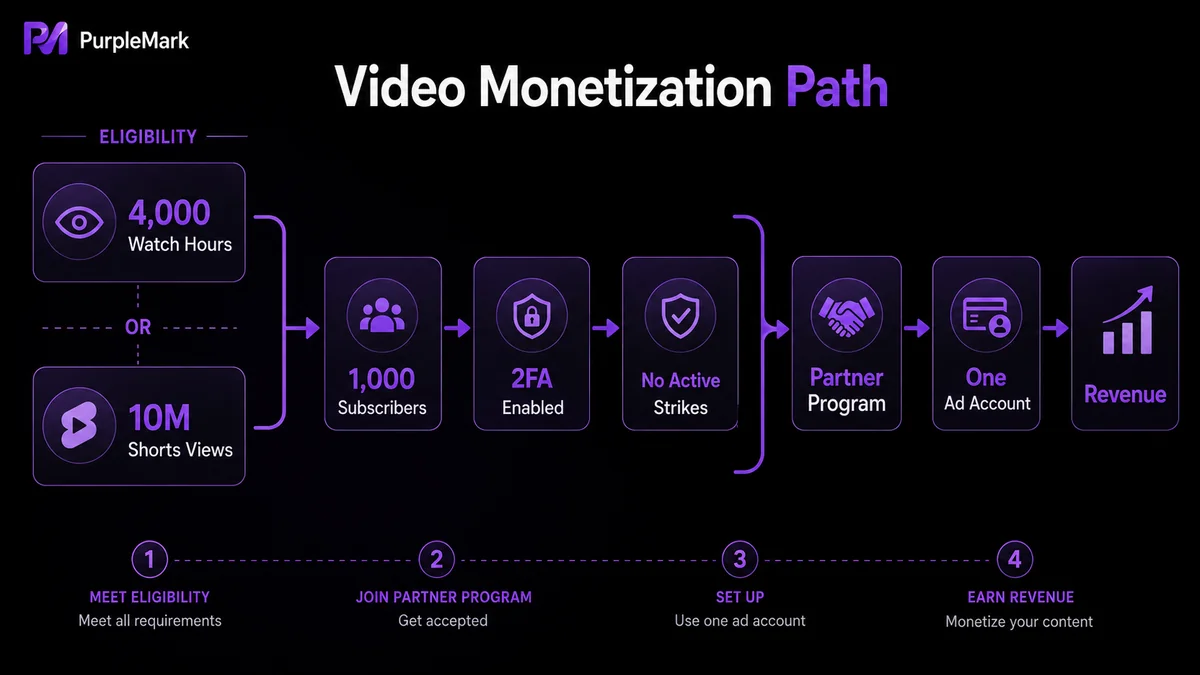
- Channel watch time: at least 4,000 hours of valid public watch time in the past 12 months, or 10 million Shorts views in the past 90 days;
- Subscribers: at least 1,000 subscribers;
- Regional availability: the channel owner lives in a country or region where YPP is available;
- Policy compliance: the channel follows Community Guidelines, copyright policies, and advertiser-friendly content policies.
Account-related requirements
- Link a valid AdSense account (if you do not have one, you can create and link it in YouTube Studio);
- Two-step verification is enabled for the Google Account;
- The channel has no active Community Guidelines strikes.
Additional requirements for other monetization features (advanced): Channel memberships require 500 subscribers plus recent public uploads and a watch-time threshold; Super Chat/Super Stickers require you to be at least 18 and located in a supported region; Shopping, Super Thanks, and other features each have separate criteria.
⚠️ The most important compliance point: one individual may have only one AdSense account. Under Google policy, no matter how many YouTube channels you operate, the revenue from all of them must be settled through the same AdSense account. Do not register multiple AdSense accounts to “split” revenue, as this may lead to account suspension.
How Do You Create and Link a YouTube AdSense Account?
1. Sign in to YouTube Studio. Open youtube.com and sign in to your channel, then click your profile picture in the upper-right corner to enter YouTube Studio.
2. Join YPP. In the left menu of Studio, click “Earn” to check whether your channel meets the requirements. If it does, click “Start” on the “Sign up for AdSense for YouTube” card and follow the prompts to apply.
3. Link an AdSense account. The system will ask whether you want to link an existing AdSense account to the channel. Sign in to your AdSense account, click “Add site,” enter the channel URL, and provide an email address (usually the Gmail address used to create the channel). After submission, YouTube will review the channel. Once approved, you can enable ads from the “Earn” page.
Other Ways to Monetize on YouTube
In addition to AdSense ad revenue sharing, you can combine the following methods:
- Channel memberships: offer fans exclusive content, badges, emojis, and other benefits in exchange for a monthly membership fee;
- Super Chat / Super Messages: viewers pay during live streams to make their messages more prominent;
- YouTube Premium revenue: receive a share of revenue when Premium subscribers watch your videos;
- Brand sponsorships and partnerships: create sponsored content or promote products for brands;
- Merchandise sales: use merchandise shelf features to sell clothing, accessories, books, and other products in videos;
- Affiliate marketing: add product links to video descriptions and earn commissions from sales;
- Drive traffic to owned channels: guide viewers to your own website, community, or mailing list.
The Right Way to Handle “Multi-Account Operations”
One point needs to be clear: YouTube explicitly restricts using multiple accounts to increase revenue, especially multiple AdSense accounts. This violates policy and creates a risk of account suspension. Always monetize compliantly under your real and unique creator identity.
If you are an agency or team managing separate channels for multiple creators under the same company, the key is for each creator to settle revenue using their own real, independent Google and AdSense identity, and for each creator to sign in consistently from their own fixed device and network environment—do not share credentials or environments with one another. A clear, isolated, auditable workspace for multi-person collaboration (such as PurpleMark member permissions, grouping, and activity logs) can help standardize management, but it should never be used to bypass YouTube/AdSense account rules.
Frequently Asked Questions
What if my channel meets the requirements but my application is rejected? This is usually because the content does not comply with YouTube or AdSense policies or there is another violation. Check whether the channel follows Community Guidelines and advertising policies, resolve any issues, and then reapply.
Can one channel use multiple AdSense accounts? No. A single payee may have only one AdSense account. Using multiple accounts can lead to suspension.
How much can you earn through AdSense? It depends on views, ad click-through rate, ad rates, and the geographic location of viewers. Typically, every 1,000 views may generate anywhere from a few dollars to several dozen dollars, depending on the channel and content.
What are the ways to make money on YouTube? Ad revenue (AdSense), channel memberships, sponsorships, merchandise sales, YouTube Premium revenue, affiliate marketing, and driving traffic to your own channels, among others.


