
Reached LinkedIn's weekly connection invitation limit while prospecting? Learn why the limit exists, what affects it, and how to send more high-quality invitations within the rules without opening extra accounts.
Anyone who uses LinkedIn for prospecting has probably seen this message: You've reached the weekly connection invitation limit. It is frustrating when you still have plenty of prospects to add but the system stops you. But don't think about "opening several more accounts to bypass the limit"—that violates LinkedIn's rules and can also trigger account-linking risk controls. The right approach is to understand how the limit is determined, then make every invitation count while staying within the rules.
Why Does LinkedIn Set a Weekly Invitation Limit?
LinkedIn limits connection invitations to prevent spam and abuse and to protect the quality of interactions and the user experience. The platform wants users to make "targeted, meaningful connections," not send indiscriminate connection requests in bulk.
That also explains why LinkedIn does not publish one fixed number—the limit is adjusted dynamically based on each account. As a general reference, many accounts can send roughly 100–300 invitations per week, and this may change as platform policies evolve.
What Affects Your Invitation Limit?
LinkedIn does not assign the limit arbitrarily. It mainly considers several factors:
- Account activity: Accounts that interact frequently and consistently share content may receive a higher limit, but sending invitations too quickly can instead be treated as spam;
- Connection acceptance rate: The higher the percentage of invitations that are accepted, the more "valuable" your network growth appears, which can make a higher limit more likely;
- Account reputation: If an account has posted spam or the system detects abnormal behavior, its limit may be reduced;
- Account age: New accounts usually have lower limits to reduce the risk of automation or abuse.
In short, the limit acts like feedback on your "social quality"—the more you look like someone genuinely building relationships, the more favorable the allowance tends to be.
Improving Your Social Selling Index (SSI) Is Key
LinkedIn uses the Social Selling Index (SSI, scored 0–100) to evaluate your social-selling performance. It consists of four areas worth 25 points each:
- Establish your professional brand: Build a complete, professional profile that highlights your experience and skills, and regularly share insightful perspectives;
- Find the right people: Use search and filtering tools effectively to identify ideal customers and relevant prospects;
- Engage with insights: Build professional authority by reading, commenting on, and sharing content;
- Build relationships: Expand your network and deepen professional relationships by offering help and building trust.
The higher your SSI, the more likely your profile is to be seen and your posts to gain exposure. More importantly, LinkedIn tends to reward users with a strong SSI, and a high SSI often has a positive effect on your weekly invitation limit. Instead of focusing on "squeezing out a few more invitations," it is better to improve your SSI first.
How Can You Send More High-Quality Invitations Within the Limit?
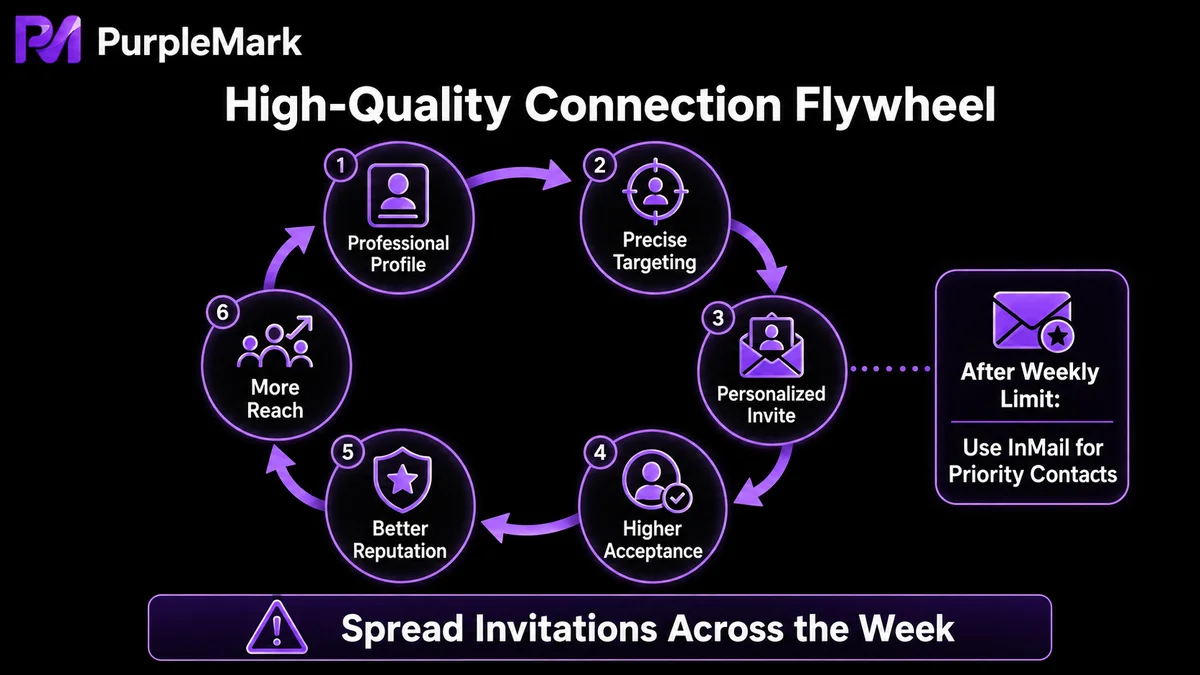
1. Improve your profile A professional photo, compelling introduction, detailed experience, endorsements, and recommendations can all improve your visibility and "acceptability." Add published articles, projects, and industry awards as well—a profile that demonstrates real expertise is more likely to attract quality connections and can indirectly affect how LinkedIn evaluates your invitation limit.
2. Use search and filters to find the right people Use advanced search to narrow your audience to professionals in the same field, with shared interests, or with high relevance. Avoid sending large numbers of indiscriminate requests. LinkedIn's "People You May Know" feature is also useful—people who share mutual connections with you are more likely to accept because there is already a layer of trust in the network.
3. Upgrade to LinkedIn Premium / Sales Navigator if needed Paid subscriptions typically provide more ways to reach people, including InMail allowances. InMail lets you contact users you are not connected with directly and often gets higher open rates, making it useful for key prospects. The accompanying customer and business insights can also make your networking strategy more targeted.
4. Spread invitations out instead of sending them all at once Sending a large number of requests in one burst is one of the easiest ways to trigger spam warnings. A safer approach is to spread invitations throughout the week, starting with a few per day and increasing gradually as your acceptance rate allows. This reduces the risk of alerts and gives you time to personalize each invitation, improving acceptance—and the more invitations that are accepted, the more likely your limit is to become more flexible.
About "Multiple Accounts": Don't Use Them to Bypass Limits
Some advice suggests opening several LinkedIn accounts and splitting invitations across them to bypass a single account's limit. Be careful: LinkedIn's invitation restrictions are based on account behavior, and one real person should correspond to one account under the platform's expected use. Using multiple accounts to evade limits or fabricating multiple identities can lead to restrictions or bans if the accounts are identified as belonging to the same person or being automated.
There is one legitimate multi-account scenario: an agency or studio managing LinkedIn for genuinely different brands or clients. In that case, each client account should have its own stable login environment and network egress, so different clients' accounts are not mixed in the same browser. PurpleMark's web workspace can create separate browser environments for each client, bind each to its own proxy, and use groups to clarify "which account belongs to which client"—but only when those accounts represent real, distinct client entities rather than a batch of fabricated accounts for one person.
Frequently Asked Questions
What is LinkedIn's weekly invitation limit? LinkedIn does not publish a fixed number. It is often roughly 100–300 invitations, but the exact amount changes dynamically based on account activity, acceptance rate, reputation, and account age.
How can I increase my LinkedIn invitation limit? Improving your SSI score, staying active, increasing your connection acceptance rate, and maintaining a good reputation can all help. Avoid one-time bulk sending or scripted behavior, which can instead reduce your limit.
What can I do if I hit the limit but still want to contact more people? Upgrade to LinkedIn Premium / Sales Navigator for additional InMail capacity so you can message people you are not connected with. At the same time, improve your profile and SSI to indirectly support a more favorable invitation allowance.
How can I avoid triggering spam warnings when sending invitations? Spread invitations across the week, start with small numbers and increase gradually, and make every invitation personalized and relevant—do not mass-send the same template.


