
If your post reach suddenly collapses, other people cannot find you in search, or your replies are hidden, your X account may be experiencing visibility restrictions. This guide explains how to identify a possible shadowban, common triggers, and practical steps to restore normal reach.
Anyone managing a brand or personal presence on X may have seen this: everything looked normal yesterday, but today post impressions suddenly collapse. You can still publish, yet other people cannot find you in search, and your replies are mysteriously folded away. If you can log in and post normally but it feels like nobody can see you, the problem may not be a lack of traffic—it may be reduced visibility on X (formerly Twitter).
Visibility restrictions are less obvious than a suspension. They often work as a hidden reduction in distribution. Knowing how to recognize the signs, identify likely causes, and recover correctly is essential for anyone using X for brand building or customer acquisition.
What does “being throttled” mean, and how is it different from a suspension?
Reduced visibility is not the same as account suspension. On X, it usually appears in two forms:
- Shadowban: the least visible form. X does not notify you, and you can still post and like content, but your posts are quietly deprioritized. Existing followers may still see them, while other users are far less likely to encounter them in feeds or search, making it difficult to attract new followers or customers;
- Rate Limiting: a more direct protective mechanism. X limits how many actions an account can perform within a given period to reduce pressure from automation. If you repeatedly exceed the threshold, you may see a message that you have reached an action limit and temporarily be unable to refresh, follow accounts, or send DMs.
The common thread is that these systems react to abnormal activity and low-quality or spam-like behavior. Understanding that helps you choose the right response.
How can you tell whether your account is being limited?
When your account behaves abnormally, check these three signals:
- Posts missing from search results (Search Ban): your posts do not appear at all when searching a keyword or hashtag, even when results are sorted by “Latest”;
- Replies are collapsed (Ghost Ban): your comments under other posts are hidden behind “Show more replies,” or only you can see them;
- Your account disappears from search suggestions (Search Suggestion Ban): when someone types your ID into the search box, X no longer automatically shows your profile photo and full account name, and the user must enter the exact full ID to find you.
If one post occasionally fails to appear, there is no need to panic. But if multiple posts show these symptoms for several consecutive days, your account may have been deprioritized.
Use a self-check tool: besides manual observation, you can use third-party visibility checkers. For example, Hisubway can simulate X search behavior to see whether your posts appear in search and whether replies are collapsed. Circleboom Twitter is a long-standing X partner tool that provides Shadowban-related checks and can help audit inactive followers or remove repeated historical link posts. Visibility checkers should be used only to understand account status; tools that do not require account authorization generally reduce risk.
Why can visibility restrictions happen?
X’s risk-control systems primarily try to filter automated behavior and low-quality content. Common triggers fall into three groups:
1. Exceeding action-frequency limits
Large numbers of actions in a short period are a common trigger. For example, following dozens of accounts in one minute or liking hundreds of posts in rapid succession can make the system suspect automation. Even when scripts are used for legitimate workflows, behavior that is too mechanical—such as click intervals that repeat with millisecond precision—can raise alerts.
2. Policy-violating or spam-like content
- Repeated links: posting the same marketing URL in many posts, especially shortened links;
- Keyword stuffing: forcing large numbers of unrelated trending hashtags into posts simply to chase traffic;
- User reports: content that repeatedly causes users to hide or report it may be classified as harassment or spam.
3. Abnormal login conditions and account-security signals
- Unstable network egress: frequently changing network nodes or jumping between IPs in different regions over a short period can make X think the account may be compromised and trigger protective limits;
- Too many accounts sharing one environment: if multiple accounts use the same browser environment, their underlying environment characteristics can look highly similar. If one account behaves abnormally, others may also receive additional risk scrutiny.
Restore reach in three steps
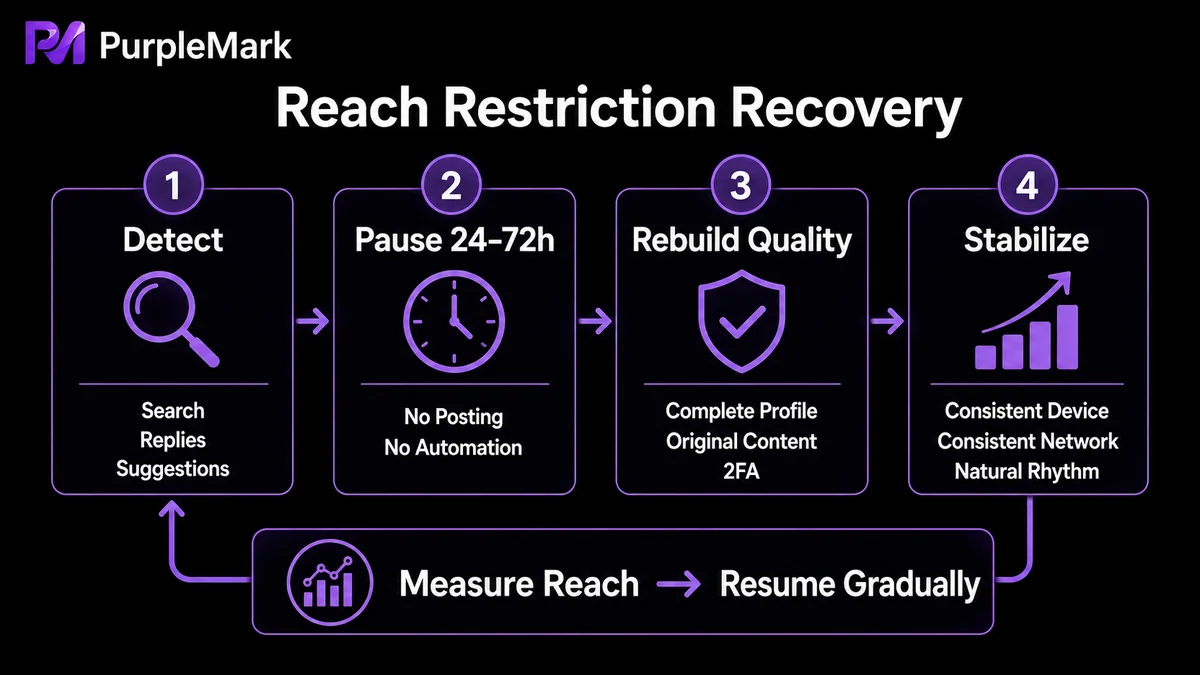
After you notice possible throttling, the worst response is to keep posting at high frequency without understanding what is happening. That can make the problem worse. Use this sequence instead:
Step 1: Go quiet for a while Stop posting, reposting, liking, and sending DMs for 24–72 hours. During this period, avoid repeatedly logging in through third-party tools. When the quiet period ends, spend a few days mostly reading rather than posting—browse normally and scroll manually from time to time so the account returns to a natural usage pattern instead of immediately resuming dense promotional activity.
Step 2: Improve account quality and trust signals
- Complete your profile: use a professional profile photo, header image, and bio;
- Enable two-factor authentication (2FA) and add a phone number: in X’s account-security logic, stronger authentication can improve trust and reduce takeover risk;
- Publish more high-quality original content: reduce repetitive outbound links and prepare more text-first opinions or original visual posts that encourage genuine interaction;
- Review sensitive-content settings: go to “Settings and privacy → Privacy and safety → Content you see” and confirm whether “Display media that may contain sensitive content” is enabled. In some cases, a visibility issue may be related to sensitive-content classification, and correcting the setting can help.
Step 3: Return to a normal, stable login and network environment
Visibility restrictions are often related to unusual login patterns. Keep the account signed in through the same stable browser environment over time, and keep the network egress stable and consistent with the account’s actual usage region. Avoid frequent device changes or rapid jumps between IPs in different regions. This reduces abnormal-login signals and helps the account remain more stable.
Multi-account operators: do not make every account share the same environment
If you manage X accounts for multiple genuinely separate brands, markets, clients, or business entities, one of the most important practices is to avoid putting all of them into the same browser environment or network egress. Shared environments create overlapping account characteristics. If one account triggers risk controls because of its content or behavior, the other accounts may receive additional scrutiny as well.
A more structured approach is to give each real business entity an independent but centrally manageable browser environment with its own stable network egress. PurpleMark’s web workspace is designed around this type of legitimate operating need: you can create separate environments for different brands or markets, bind each to its own proxy, and use groups to keep track of which account belongs to which business and which environment it uses. Daily operations remain centralized without forcing every account into the same browser window.
This type of environment separation is appropriate for legitimate accounts independently maintained by genuinely different brands, markets, clients, or business entities. Do not create fake duplicate accounts for the same entity or use disguise techniques to evade X’s platform rules. That violates platform policies and is not sustainable.
Frequently asked questions
How long does an X/Twitter visibility restriction usually last? A first-time minor restriction often lasts around 48–72 hours. Severe abuse, such as large-scale automated activity, can lead to restrictions lasting 7 days or longer.
I did not post prohibited content. Why was my reach still limited? The cause may be your login environment—for example, a network egress range flagged as suspicious or a browser environment whose characteristics closely resemble those of an account already under risk control. Returning to a normal, stable login environment can help.
How can I strengthen the account and reduce the chance of future throttling? Add a phone number, enable 2FA, browse and interact at a consistent natural pace, publish high-quality original content, and keep your login environment stable.
Can I like other people’s posts while my account is being limited? It is better not to. During a restriction, dense active engagement can look like a stress test to automated systems. A safer approach is to stay quiet first and gradually return to a normal pace after visibility recovers.


