
YouTube is tightening enforcement against low-quality, repetitive AI-generated content, and many channels built on templated production pipelines have been removed. Account health is not just about views; it also depends on original content, authentic engagement, and traceable operations. This guide explains the platform signals that can trigger enforcement and how to run channels compliantly for the long term.
Over the past two years, YouTube has clearly stepped up enforcement against low-quality content produced at scale and automatically generated AI content. A wave of channels that relied on templates and automated production lines to push volume have been removed or suspended, including some with millions of subscribers. For creators and operations teams, instead of repeatedly asking “why was another channel banned?”, it is more useful to understand what the platform evaluates and then decide how to run channels in a stable, long-term, compliant way.
What Is YouTube Actually Banning?
YouTube has repeatedly said it wants to crack down on “mass-produced / AI slop,” meaning large volumes of low-quality or repetitive AI-generated content. The goal is to filter out low-cost “traffic machines” and improve the viewing experience. Enforcement of this kind is usually triggered by two categories of signals:
Content signals
- Different accounts upload highly similar videos and only change title keywords or text on the thumbnail;
- Scripts are generated entirely by AI and mechanical voiceovers are synthesized in bulk, while watch time is short and bounce-off is high;
- Titles, descriptions, chapters, and transcripts are heavily templated or repeat one another, leading to a “mass-produced / low-originality” assessment;
- The same edited footage, clips, audio, music, or narration templates are reused repeatedly and counted as repetitive content.
Behavior and login signals
- The same team switches among multiple accounts in browser environments that are not isolated, causing cookies and local storage to be mixed and creating strong detected links between accounts;
- Low-quality proxy pools cause many account logins to originate from the same data-center IP range and be flagged as “abnormally concentrated logins”;
- Fingerprints such as User-Agent, screen resolution, time zone, fonts, and Canvas/WebGL are highly similar across multiple accounts;
- Many accounts share the same IP, ASN, or proxy pool within a short period, creating dense and highly similar login events.
One point should be clear: the platform does not ban an account because of a single anomaly. It combines multiple signals to judge whether an account is “high risk” or “inauthentic.” Once you understand this logic, it becomes easier to see which areas need attention.
Which Behaviors Increase Your Ban Risk?
- Multiple accounts use the same IP or a low-quality proxy pool for long periods: for example, several accounts log in through the same IP within 24 hours, or the login location does not match the account's historical activity, making the group look like bulk-operated or compromised accounts;
- Fingerprint configurations are highly similar: if multiple accounts have identical or nearly identical browser fingerprints, they can be clustered as devices from the same source;
- Large batches of highly templated or AI content are uploaded at the same time: sending structurally and semantically similar videos to many accounts over a short period—substantial script overlap, the same BGM/voiceover, identical thumbnail templates—combined with generally weak watch time and retention can easily trigger repetitive-content and low-originality judgments;
- Browser data is shared: switching different accounts in the same browser/session can mix Cookie, LocalStorage, and other data, which is one of the key forms of evidence used for association analysis;
- Geographic locations change frequently without a logical reason: login locations and time zones shift repeatedly in a short time and do not match the channel's market positioning;
- There is no traceable operational audit trail: credentials are shared among multiple people with no clear owner, and when an issue occurs the team cannot provide source upload files, editing records, or login snapshots, which can significantly reduce the likelihood of a successful appeal.
What Does a “Healthy” Channel Look Like?
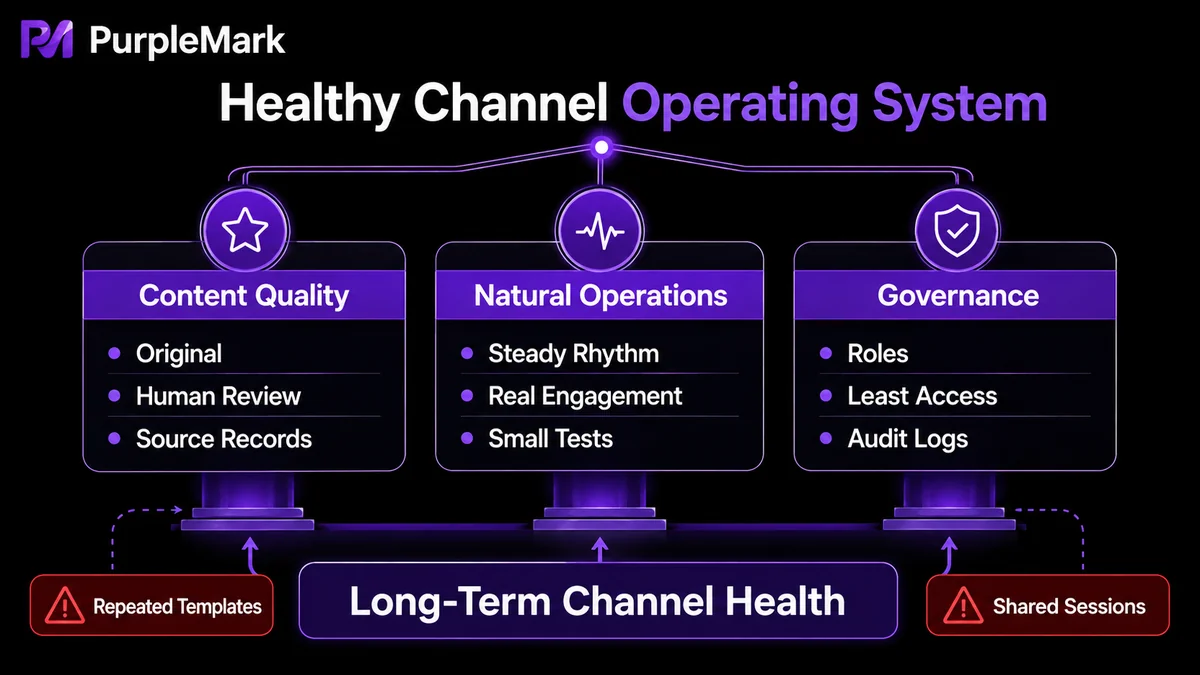
A healthy account is not defined only by subscriber count or views. Content value, natural behavior, and sustainable operations should all be strong, with stable positive relationships among these dimensions:
- Content comes first: every video should deliver clear value—information, a solution, a distinctive point of view, or an emotional connection—instead of keyword stuffing or template filler. AI can be used as a “drafting + material research” tool, but scripts should be fact-checked by people, enriched with data or examples, and accompanied by records of source materials and permissions;
- Stable publishing cadence and authentic engagement: real, recognizable human interaction—replying to comments, livestreaming, and managing a community—is important evidence that an account is active and trustworthy. Reply styles should vary and be timely rather than repeating the same scripted response mechanically;
- Channel and brand structure: a channel should serve as a durable brand asset, not merely a short-term traffic tool. When operating a multi-account portfolio, define the role of each account—test account, primary brand account, regional account—and keep the relationships between accounts explainable.
How Do You Keep a Channel “Active for the Long Term”?
1. Define positioning and KPIs Set clear short-, medium-, and long-term KPIs, such as publishing frequency, subscriber growth, average watch time, and monetization goals, and review them regularly in weekly reports. Vague positioning often leads to frequent style changes, which can confuse subscribers and increase the chance of platform misclassification.
2. Create and consistently follow a publishing plan Use a spreadsheet to list weekly topics, owners for scripts/editing/thumbnails, publishing dates, and the account used for upload. Test new content on a smaller account first, observe it for 24–48 hours, and only then publish to the main account or promote it if there are no issues. Avoid publishing the same type of video to every account at once. Use batched, staggered releases to reduce the chance of being classified as “templated distribution.”
3. Maintain content quality and avoid templating Pure AI batch production is one of the biggest risk factors. Even when covering the same topic, vary narration style, thumbnail copy, and scene assets so each piece preserves originality and localized information.
4. Build genuine engagement habits Spend 15–30 minutes each day replying to new comments, prioritizing constructive questions. Run a livestream or community-post interaction once a month, and turn high-quality comments into future Q&A/FAQ content. Interaction should be varied and naturally spread over time so it looks like real human behavior.
5. Test in small batches, then scale gradually Do not copy an unproven template at large scale. Start with 3–5 accounts for multivariable testing of the same creative concept. After confirming there are no issues, expand to 10–15 accounts. At every stage, document the differences and define a clear “scale-up threshold.”
6. Scale through clear roles and auditing Scaling should not depend only on piling on tools; it depends more on clear responsibilities and traceability. Define roles for content planning, review, and community operations, follow the principle of least privilege, and log key actions such as proxy changes, fingerprint adjustments, and account credential changes. If a problem occurs, traceable logs help with internal investigation and can also serve as useful evidence during an appeal.
Make Compliant Operations Work in Practice
To execute the methods above consistently—especially when managing multiple genuine accounts for different markets or brands at the same time—“one independent, clean, traceable operating environment per account” is close to a baseline requirement. PurpleMark's web workspace provides this kind of supporting setup:
- Create mutually independent browser environments for each business account, isolating Cookie, local storage, extensions, and system parameters to avoid associations caused by mixed sessions or data;
- Each environment can bind its own proxy and network egress, assigning IPs by market or region and reducing the concentration of multiple accounts in the same network range;
- Use groups, members, and permissions so different roles manage only the accounts they are responsible for, avoiding shared environments or credentials;
- Retain operation logs and team audits so critical actions are traceable, useful for internal management and, when needed, as supporting appeal material.
It is important to emphasize that environment isolation and tooling are intended for compliant operations in which accounts for genuinely different markets, brands, clients, or business entities are maintained independently. Do not use technology to fabricate accounts or evade platform governance of low-quality content; that is neither sustainable nor consistent with platform rules. Channels that remain “active for the long term” are always built on original content + authentic engagement + disciplined operations.
Frequently Asked Questions
If an account is mistakenly restricted as AI content, what should I do first? Preserve evidence first: original video assets, scripts, upload records, editing records, and operation logs. Then submit an appeal through the process shown on YouTube's restriction notice page and attach that evidence. If third-party tools were used, exporting audit logs and environment snapshots can speed up troubleshooting.
We are not running bots. Why do we still see “Sign in to confirm you're not a bot”? This usually means login or behavioral activity shows atypical machine-like characteristics or IP patterns, such as switching many IPs in a short period, inconsistent or repeated browser fingerprints, or abnormal request frequency. Review recent login IPs, proxies, and device differences, and standardize team login practices to reduce these prompts.
Is using an anti-detect/fingerprint browser for multi-account operations a violation? The tool itself is neutral; what matters is how it is used and whether the operation is compliant. When it is used to manage accounts for different markets or brands, isolate sessions, assign an independent owner to each account, and follow platform rules, it generally falls within compliant operational use. Prefer solutions that provide audit logs and team permission controls.
Can audit logs be used as appeal evidence after an account is banned? Yes. Providing a complete operational audit—who did what, when, and where—along with original assets and authorization evidence can materially strengthen an appeal. Final acceptance, however, remains at the platform's discretion.


