
If your quota is being used faster or some features work inconsistently, it does not necessarily mean the provider reduced your allowance. Check credential sharing, network egress changes, and mismatches between the browser environment and egress location before reviewing your own usage habits.
Your subscription is still active and you are still paying the same, yet the quota seems to run out faster than before. This is a common experience among heavy users of AI tools. Some assume their account has been downgraded; others blame the provider for cutting quotas. In practice, the cause is often spread across several areas: someone else may be consuming the same quota, the account may have triggered security restrictions that temporarily narrow certain features, or your own usage pattern may simply have changed.
These situations can look similar, but the fixes are completely different. Separating them will save a lot of effort.
First, check whether someone else is using the account
Multiple people, locations, or devices signing in to the same account at the same time is one of the most common and easily overlooked sources of consumption. The quota is shared and sessions run concurrently, so the platform sees a single account generating many requests in a short period while the source regions, devices, and usage patterns conflict with one another.
Giving your account password or access credentials to a third-party service that centrally schedules requests and redistributes access to multiple people is even harder to spot. From your perspective, you may only be connecting to one endpoint; from the platform's perspective, a crowd of users is sitting behind the same account. In addition to splitting the quota, there is a real risk that retained credentials could be abused.
Two cases should be distinguished here. A company using its own official API keys and managing requests through a compliant gateway is normal. The situation to be wary of is an unofficial relay that pools an individual's subscription quota and asks you to hand over account credentials. If you suspect the latter, stop the related requests first, change the password, sign out of all devices, enable two-step verification, and then review unfamiliar login sessions and unexplained usage one by one.
Is the network egress jumping around?
When an account starts behaving abnormally, many people immediately switch proxies, then try another one when the first does not work. For an account that has been in use for some time, jumping from one country to another within a short period can make the login history look even more suspicious.
Whether an egress route is suitable for long-term use depends on more than the country it is in. You also need to consider whether the egress is stable, whether many people share it, whether its region changes frequently, whether it matches the time zone and language normally associated with the account, and whether the same account is signing in through multiple egress routes at once.
During troubleshooting, you can temporarily disable proxies and automation scripts, then sign in again from one trusted device over one stable network and observe whether normal behavior returns. Service providers also commonly recommend this approach in guidance about unusual activity.
The browser environment does not match the network egress
If the egress is fixed, why can problems continue? Because platforms never judge the login environment by the network address alone.
Browser version, operating system, time zone, language, screen resolution, Canvas, WebGL, and WebRTC can all be read and used to assess whether a device or access pattern looks unusual. A typical mismatch looks like this: the egress is in the United States, but the browser still reports an Asian time zone and a Chinese system language, while the network information exposed by WebRTC does not match the egress either. The address changed, but the rest of the environment did not, so the platform sees a contradictory access profile.
A regular proxy only changes the network egress; it does not automatically align the time zone, language, geolocation, and device characteristics. So even if there is only one account and you are the only person using it, you can still get stuck at the stage where the address is stable but the environment does not match.
A few things that help keep daily use stable
What really matters is keeping the account, environment, and network isolated from one another. Each account should have its own independent browser environment, with Cookies, cache, and local data kept separate, while its egress is also independent and relatively stable.
In terms of usage rhythm, try to stay close to how one real person would operate. Avoid high-frequency batch requests over short periods, and do not frequently switch devices, routes, or environment parameters. None of these practices is new, but together they can prevent many hard-to-explain anomalies.
If you need to operate multiple accounts on the same computer at the same time, the environment-isolation layer can be handled by a dedicated tool. PurpleMark provides this kind of capability: each account gets its own independent configuration so they do not interfere with one another.
Sharing one subscription across a team creates another category of risk. Giving the account password directly to team members simply recreates multi-user sharing, which accelerates quota consumption and can also trigger sharing restrictions. A more stable approach is to assign each member an independent subscription. If collaboration under the same account is truly necessary, make sure each person works in a separate environment and keep traceable usage records.
Troubleshooting order
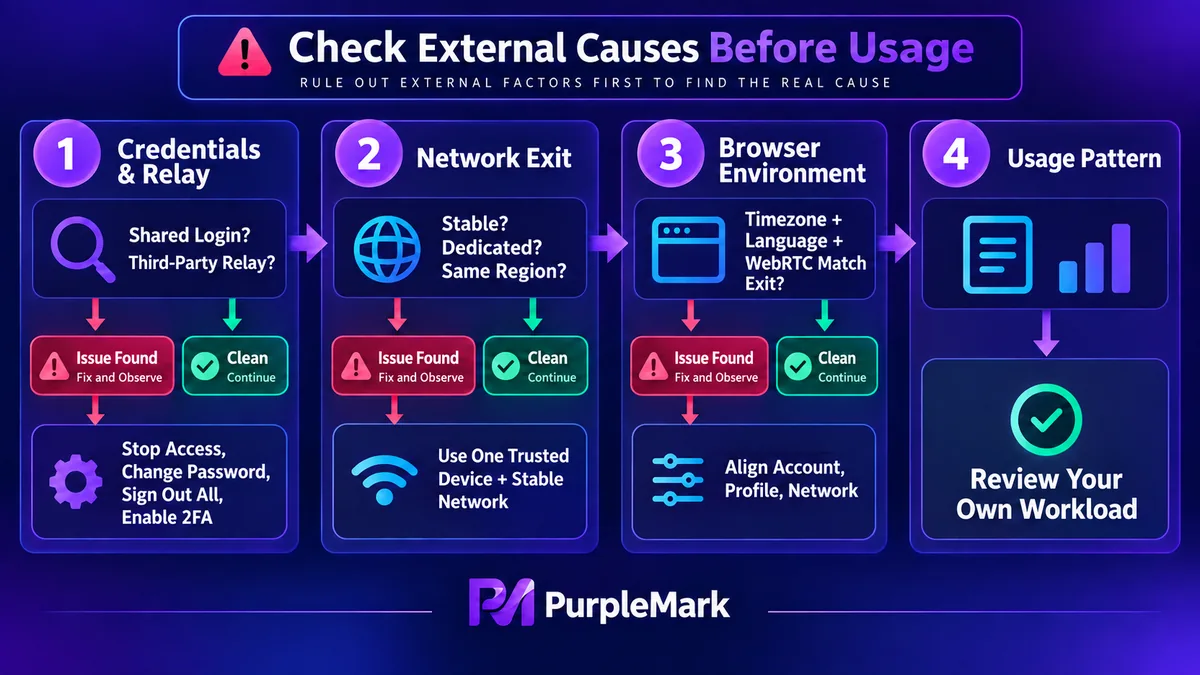
First rule out lent credentials and third-party relays. Next, check whether the egress is stable and consistent with the region normally used by the account. Finally, verify that the browser environment and egress are aligned. If all three areas are clean, the issue is most likely in the distribution of your own usage.
Changes in quota consumption are rarely caused by a single factor. Treat the situation as a troubleshooting process rather than an emotional reaction, and it becomes much clearer to handle.
For specific quota and billing rules, refer to the service provider's official documentation.


