
Fingerprint browser comparisons often conflict because requirements differ. First classify your needs by account volume, number of platforms, team collaboration, and API needs; then score five capability areas and verify each one during a real trial.
There are many fingerprint browser comparison articles, and their conclusions often contradict one another: one says product A is better, another says product B. The reason is not necessarily that someone is lying, but that the standard for “better” depends on the use case. The real first step in selection is not opening a product list, but clarifying your own requirements.
Start with four questions to classify your needs
The first question is account volume. Fewer than 10 accounts, 10 to 100, and more than 100 are three very different situations. With fewer than 10, the priority is clean isolation and low-cost validation. Once you reach hundreds, the focus shifts immediately to bulk creation, group management, bulk import and export, and the success rate of concurrent launches. If you cannot find environments once there are many of them, or changing one setting requires clicking through them one by one, operations quickly become unmanageable.
The second question is the number of platforms and the strength of their risk controls. Working on one platform is different from having one account span multiple platforms, because the requirements for internally consistent parameters are not the same. Platforms with strict risk controls may watch details such as time zone, language, Canvas, and WebGL. If parameters within an environment contradict one another, having more parameters does not help.
The third question is whether you need team collaboration. A solo operator does not need a permission system. When three to ten people divide responsibility for a group of accounts, environment sharing, tiered permissions, and operation logs become essential. As the team grows, responsibility cannot be assigned clearly without logs and permissions. That is the real pain point, not a lack of technical features.
The fourth question is whether you need an API. If you want to connect environments to your own automation system or an AI Agent, ideally every step—from creation and launch to query, stop, and reclamation—should be available through an API. If even one lifecycle step requires someone to click through the interface manually, the automation chain breaks there.
After answering these four questions, the set of suitable options usually becomes much smaller. The most common mistake is skipping this classification and going straight to products, then buying the highest-tier plan only to use less than half of its features.
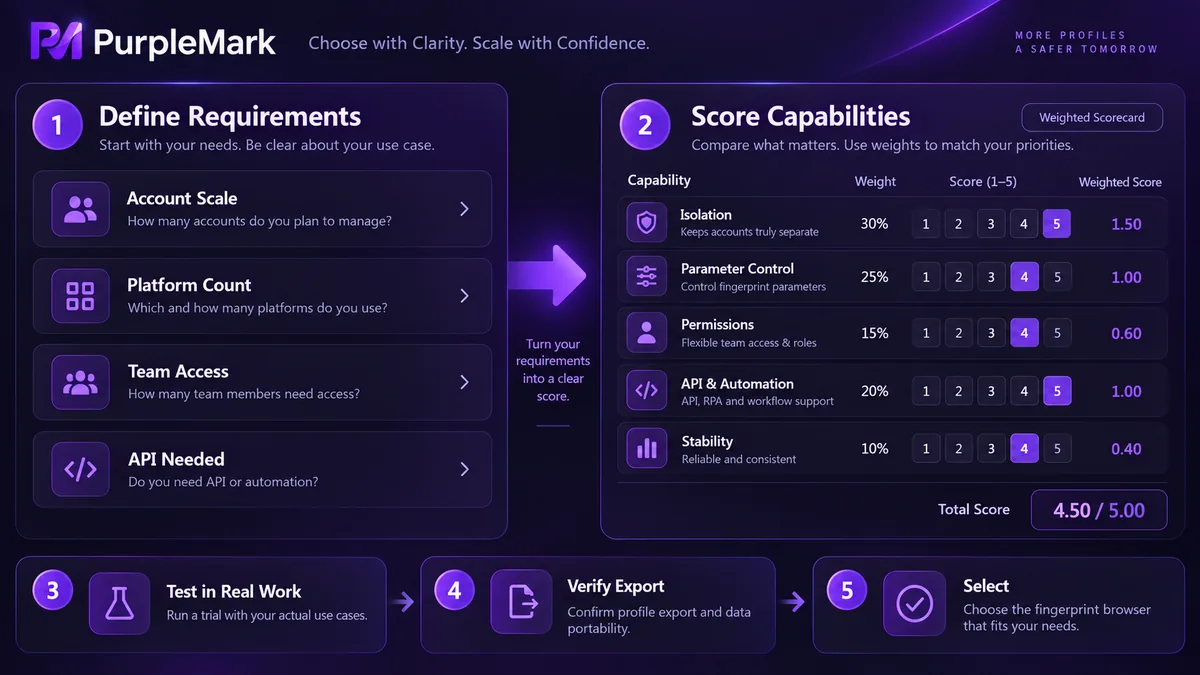
Then score candidates across five dimensions
Once requirements are classified, use the same yardstick for every candidate. Two of the five dimensions are baseline requirements.
Environment isolation comes first. Whether fingerprints, Cookies, and local storage stay separated determines whether the tool works at all. If isolation is incomplete, the remaining capabilities do not matter.
Parameter controllability has two parts: whether geographic settings such as time zone and language can automatically match the network egress, and whether parameters inside the environment contradict one another. Having more editable parameters is not the same as achieving better isolation. Fewer contradictions matter more than a larger parameter count.
Team permissions are the dividing line for collaborative use. Can you share an environment with a member without handing over the original password? Can you grant different permission levels? Are operation logs available? If any one of these is missing, team use will eventually run into problems.
APIs and automation determine the upper limit. Confirm whether environment creation, launch, query, and stop can all be handled through an API, whether the tool works with mainstream automation frameworks, and whether it supports protocols such as MCP so AI tools can connect.
Stability comes last in the list, but it is often exposed only after deployment. It has two layers: whether the browser core keeps up with mainstream browser versions and how quickly it responds after platforms change their risk controls; and what launch success rate and resource usage look like when dozens of environments start at the same time.
The scoring method is simple: rank these five dimensions according to your business needs and eliminate candidates that fail any non-negotiable requirement. Do not compromise on a baseline. Costs that appear to be saved up front often return later as failures and rework.
Trial-stage verification checklist
Do not rely on product descriptions alone. Use the trial quota to run your actual workflow. Each item below can be verified directly.
For isolation, first confirm that environments do not leak into one another and that Cookies and local storage remain independent. Then check whether WebRTC exposes the real network egress. Finally, verify that fingerprints differ enough across multiple environments.
For consistency, focus on whether time zone and language match the network egress and whether any internal environment parameters contradict one another.
For stability, launch around a dozen environments at once and observe the success rate, launch time, and resource usage. Then check the browser core version and update log against current mainstream browser versions.
For teams, actually run through sharing, permissions, and logs to see whether they are usable in practice rather than merely present in a menu.
For APIs, run the full lifecycle from environment creation to reclamation through the API and identify any step that still requires manual intervention. This determines whether the automation can work end to end.
There is one more capability many people overlook during selection: data export. When you switch tools, can you fully export environment and account information? This determines how strongly you are locked into a single tool.
A two-week trial is a reasonable target, and the scale does not need to be large. Running a small real workflow is more informative than any comparison table.
Three common mistakes
Comparing the number of fingerprint parameters. More editable parameters and better real-world isolation are two different things.
Trusting rankings published by vendors themselves. Most such rankings are released by vendors, and their own product is usually placed first. The only reliable way to judge is to run your own test cases.
Looking only at price. The cost of a cheaper option is often shifted into staff efficiency, failure rates, and account losses. For multi-environment tools, the real expense is not the software fee but rebuilding after accounts run into problems.
Comparing price first and capability second reverses the right order and usually leads to rework.


