
Browsers can be grouped into four practical types: local, antidetect, cloud phone/cloud browser, and automation-focused. This guide explains what each type handles, when not to use it, and a task-based selection path: decide how identities are managed first, then where the work runs.
Choosing a browser often starts with the wrong question: which one is better? A more useful question is: what work do I need to do in this browser? By responsibility, the practical choices fall into four groups: ordinary browsers on your computer, antidetect browsers for account identities, cloud phones or cloud browsers that run remotely, and automation-focused browsers for scripts and AI.
Local browsers: easiest to use, first to hit limits
For everyday browsing, research, and signing in to a few of your own accounts, a local browser is the simplest choice. Add a privacy extension and disable unnecessary syncing, and the cost is almost zero.
Problems appear as the number of accounts grows. Multiple profiles can keep Cookies separate, but the underlying device characteristics remain the same. Proxies are usually configured globally, so each profile cannot easily have its own exit. With many profiles, the lack of groups and labels also makes them harder to manage. More importantly, identity consistency becomes an issue: when several accounts share one machine and one environment, a platform may see them as activity from the same operator.
These tools are designed to make tracking harder by adding randomness and reducing fingerprint entropy. Multi-account work needs the opposite: long-term stability and parameters that remain internally consistent. The goals are opposite, so one approach cannot replace the other.
Antidetect browsers: one coherent identity per account
An antidetect browser creates an independent environment for each account. Fingerprint parameters are generated as a set and then kept stable, including IP, time zone, User-Agent, Canvas, WebGL, audio fingerprint, font fingerprint, and media-device IDs. Cookies and local storage are isolated from one another. Once created, the parameters stay fixed, so the next login still looks like the same device.
A proxy is bound to each environment, giving every environment its own exit and supporting common protocols such as HTTP, HTTPS, and SOCKS5. After the proxy is attached, time zone and language can also be matched, avoiding inconsistencies such as a U.S. IP with a language and time zone from somewhere else. Platforms never judge whether an environment looks like a real user from the IP alone.
Management is the other half of the value: groups, labels, notes, bulk import and export, bulk configuration changes, and bulk start/stop actions. Environments can also be created and recycled through an API, allowing scripts and AI to call them directly.
The limits matter too. This category is not designed for ordinary daily browsing, and both complexity and cost are higher. Another long-term issue is whether the browser core keeps pace with changes in platform risk controls. When evaluating a product, it is worth reading the changelog to see whether it explains concrete changes or mostly repeats generic wording.
Cloud phones and cloud browsers: move the device to the cloud
Both categories move the runtime away from the local machine. A cloud phone provides a mobile device in the cloud, which suits mobile scenarios that require a real-device environment or an installed App. A cloud browser provides a browser instance in the cloud, so local memory and compute resources do not carry the load.
The trade-offs are straightforward. Billing is time-based, so costs rise roughly with how long and how many instances you run. Network round trips add latency, which is unfriendly to tasks that need precise interaction, and local assets must be uploaded first. In return, access is convenient across devices and locations, and several teammates can connect to the same cloud device.
One point is often missed: a cloud instance is usually only an execution location. Account identity does not automatically live there, so identity management and isolation still have to be designed separately.
Automation-focused browsers: executors for scripts and AI
This type of browser has one goal: execute a workflow well. It supports programmatic control, can be connected to external frameworks through the CDP protocol, and can be invoked by AI tools through an interface for page operations, screenshots, content reading, and form filling.
It is well suited to collection, regression testing, and repeated actions at scale. It does not carry account identity by itself. In multi-account scenarios, the usual pattern is to connect it to an existing isolated environment: execution stays in the execution layer, while identity stays in the identity layer.
Its limitation is the lack of business judgment. If a page is redesigned or an element disappears, the script fails. Someone still has to make decisions before execution and handle exceptions afterward.
Walk through the task characteristics
A useful decision order looks like this.
First ask whether the work needs multiple account identities to remain stable over the long term. If yes, look at antidetect browsers. If not, continue.
Next ask whether there is a hard requirement for a real-device environment or a mobile App. If yes, look at cloud phones. If the goal is only to move workload off the local machine, look at cloud browsers.
Then ask whether the task is driven by scripts or AI and repeatedly runs the same workflow. If yes, use an automation-focused browser while leaving account identity to the environment layer and connecting the executor to it.
If none of those conditions applies, a local browser with privacy settings is enough; there is no need for a heavier tool.
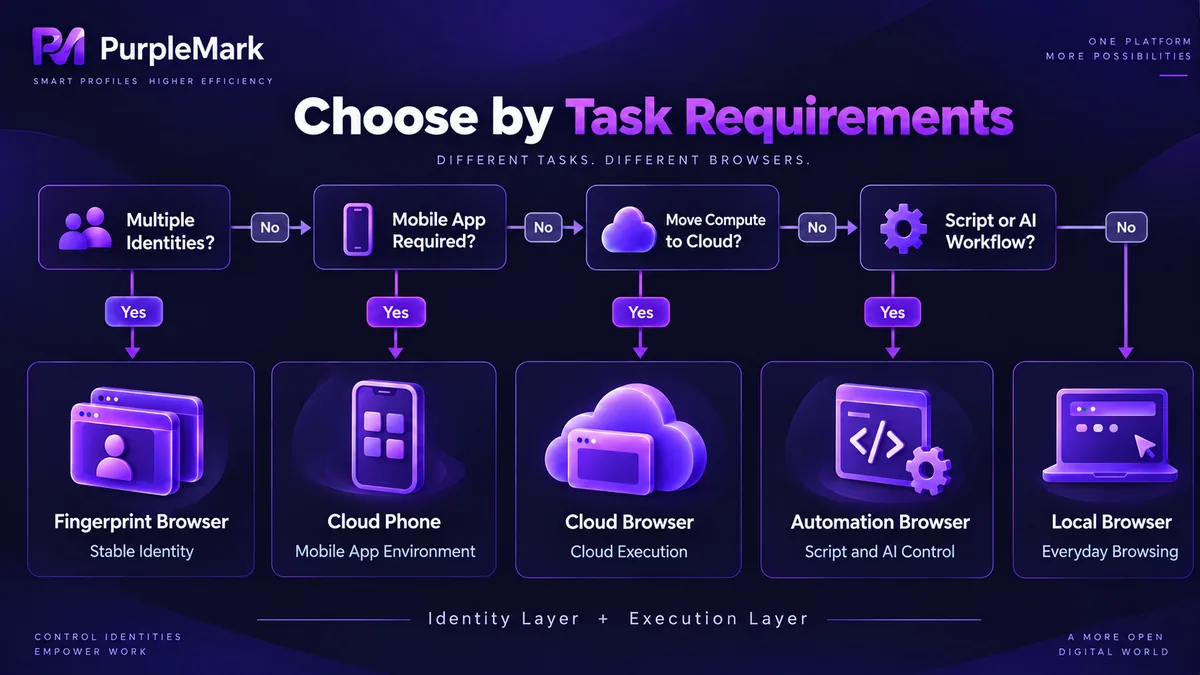
In real projects, these categories are often layered together: an antidetect browser handles identity at the environment layer, an automation browser runs workflows at the execution layer, and parts that need real devices or remote access move to the cloud. In scaled multi-account scenarios, environment-management tools such as PurpleMark fill that environment-layer role by separating each account's identity and session so that upper-layer executors can operate on them.
In one sentence: decide how identities are managed first, then decide where the work runs.


