
When an ad is rejected, the problem is usually not the bid. It is more often inconsistent business details, creative content, audience settings, or a landing page that does not match. Checking these items before account setup saves far more effort than repeated appeals later.
People preparing to run Snapchat ads often get blocked not by bidding or creative ideas, but because the account or the ad materials themselves do not meet requirements.
The logic behind the platform’s ad policies is consistent: protect users from being misled. Once you keep that principle in mind, the direction for self-checking becomes much clearer.
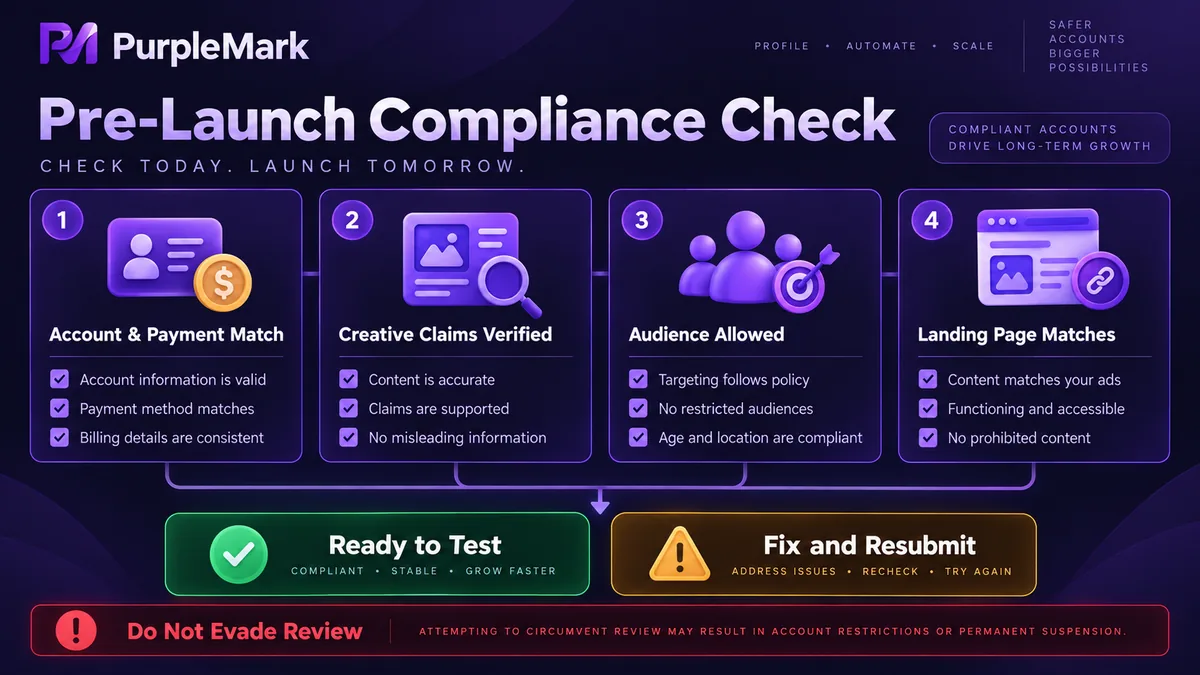
Account and payment information must be genuine and consistent
When an account is opened, the platform checks whether several items line up: the account registration region, the actual location of business operations, the region tied to the payment method, and the business identity information versus the qualification documents submitted. If these items conflict, the result may range from additional verification to an unusable account.
The payment method must be able to complete real charges, and the card type and billing address should match the account region. False information or borrowed identity details will eventually surface during settlement, and problems of this kind usually leave little room for remedy.
The login environment should also be consistent as a whole. A mismatch among the IP region, system time zone, and language is a typical anomaly signal and can easily send the account into verification. For an advertising account, use an independent and stable operating environment, keeping the network exit, time zone, and language aligned. In multi-account or team workflows, environment isolation can be handled by tools such as PurpleMark.
Key red lines for ad creatives
Creatives are where review rejections are most concentrated. Common issues usually fall into the following categories.
Restricted categories. Different markets impose explicit restrictions or bans on areas such as finance, healthcare, adult content, alcohol, and gambling. The rules for the same product can also differ by country. Before launch, confirm what the target market allows instead of applying the experience of one market to another.
Exaggerated promises. Claims such as “guaranteed returns,” “results in X days,” “works forever,” or “profit with no risk” are almost certain to be rejected because they cannot be verified and carry a high risk of misleading users.
Before-and-after comparisons. Materials that compare changes in the body, appearance, or health status are strictly restricted under most platforms’ advertising policies. Manipulating images to manufacture an effect is likewise unacceptable.
Misleading elements. Fake countdowns, fabricated user reviews, forged media reports, and false institutional endorsements are explicitly prohibited. Any data you cite should have a verifiable source.
The self-check is simple: review the copy sentence by sentence and ask two questions—does this sentence promise something I cannot deliver, and does it contain a claim that cannot be verified? Review decisions largely turn on these two points, so using the same logic for self-checking can make a clear difference in approval outcomes.
Audience and regional restrictions
Audience settings commonly go wrong in two directions: they are too broad, or they use targeting that should not be used.
Age is the strictest rule. Certain categories have minimum-age requirements, so targeting cannot go below the platform’s threshold and audience descriptions cannot be used to bypass it indirectly. Some markets also impose additional entry requirements for specific categories, so confirm the rules of the target country before launch.
Targeting based on sensitive attributes such as health status or financial circumstances is also commonly restricted. Even if the platform allows such an audience to be created, it may still be blocked during use.
It is better to be narrower and more precise. Broad audiences not only convert poorly; they may also reach people who should not be targeted, effectively sending the ad straight into additional review.
The landing page must match the creative
This is one of the easiest items to overlook. Reviewers may actually open the landing page to verify that what the creative promises is present there.
If the creative promotes a limited-time discount, the landing page should show that discount. If it promotes a particular product, it is better to link directly to that product page rather than make users search from the homepage. If the creative promises a free trial, the landing page cannot show only paid plans. When they do not match, rejection is the usual result.
The landing page itself also has basic requirements: it must be accessible, load without timing out, and display completely on mobile. Snapchat traffic is primarily mobile, so the page’s phone experience directly affects both review and later conversion.
What to do after an ad is rejected
When you see a rejection, first check the reason. The platform usually provides a broad category. Use it to identify which specific issue above applies, then make the correction.
Resubmit only after making changes. Repeatedly submitting the same creative without modifying anything simply accumulates rejection records and does not help the account.
If you genuinely believe the decision is incorrect, use the appeal channel. Organize and attach qualification documents, support for the creative claims, and landing-page details. This is more effective than repeatedly submitting the same ad. During an appeal, do not use another account to run the same creative just to “see what happens”; changing accounts does not change the review conclusion.
There is one bottom line: do not look for ways to evade review. Altering creatives to bypass detection, using distorted text to hide keywords, or opening accounts with someone else’s credentials may work briefly, but if discovered, the account and associated assets may be handled together. The cost is far greater than the time saved.
A sensible order for starting with a small budget
Do not start with large-scale spending. A steadier sequence is to first run one ordinary ad with a very small budget to confirm that the account can be charged normally and the ad can pass review. Then use small budgets to test two or three sets of creatives and observe approval plus basic performance data. Once you identify directions that both pass review and perform reasonably, scale up gradually.
When scaling, change only one variable at a time. Adjust budget, audience, and creative separately. If all three move together, you will not know which one caused the change in results.
Three reminders
Audiences, conversion settings, and campaign history in an ad account are built up over time. A single account problem can reset all of that, so keep configuration backups and use layered permissions in daily operations.
If you manage multiple ad accounts at the same time, give each one an independent environment to reduce the risk of several accounts being handled together because their environments are linked.
Advertising policies are not fixed text. Checking the latest requirements for the target market before launch is more reliable than copying experience from a few months ago.
Specific rules are subject to Snapchat’s official advertising policies and the laws of the target market.


