
Cloud VMs and cloud browsers are billed by time, so batch workloads can hit quotas quickly. Estimate consumption, set a practical concurrency ceiling, and follow a clear recovery order when quotas are exceeded.
For resources billed by time, the billing logic is straightforward: runtime multiplied by the number of instances. A quota is a hard ceiling. Once you hit it, jobs do not merely slow down—they fail outright: new instances cannot be created, running instances may be reclaimed, and APIs begin returning rate-limit errors. Knowing how close you are to the limit is more useful than simply increasing the budget afterward.
First, separate necessary consumption from optional consumption
The same quota can produce very different results depending on which jobs consume it. Start with an inventory and separate tasks according to whether they really need real-time execution.
Always-on jobs are among the easiest ways to burn through quota. They may run all day even though they do useful work for only a few minutes. Changing continuous monitoring to scheduled triggers can often remove a large share of consumption with almost no business impact. Peak jobs concentrated in certain time windows can be shifted, while one-off jobs can be started only when needed.
Then ask one question: would the business be affected if this job ran six hours later? If yes, keep it on the critical path and run it in real time. If not, move it to a low-priority batch and schedule it for a period when quota is less constrained. Changing competitor price monitoring from hourly to twice a day usually does not materially reduce its information value.
How to estimate consumption and set concurrency
When billing is based on instance runtime, the total consumption of a batch is roughly the average duration of one task multiplied by the number of tasks. It does not depend on how high you set concurrency; concurrency only determines how quickly the batch finishes. What concurrency does affect is instantaneous pressure: the more instances start at the same time, the more likely you are to hit the resource pool's concurrency ceiling or platform-side rate limits.
So start with the smallest concurrency. Run one task first and confirm its average duration and success rate. Then gradually increase to a few tasks and then a dozen or so, recording failure rates and retry counts. Once failures rise noticeably beyond a certain point, you have found the practical ceiling. Raising concurrency further only gives back the time you saved through extra retries.
Do not forget hidden time when estimating: login waits, page loading, verification steps, and failed retries can easily take longer than the main workflow itself. Leaving margin for each task is more useful than trying to calculate everything to the minute.
What quota exhaustion looks like
Quota exhaustion can be hard to recognize because it often resembles other failures.
One symptom is a task getting stuck during startup because the request to create an environment or instance is rejected, leaving only a vague error in the logs. Another is an instance being reclaimed midway, wasting all earlier progress. You may also see rate-limit errors, partial successes mixed with failures, or a queue that keeps growing with no workers able to process it.
The easiest case to misdiagnose is a false hang: the instance still exists and the task appears to be running, but it is actually blocked on a wait while quota continues to be consumed over time. When that happens, check the quota usage panel first, then try one small task by itself. If the small task cannot start either, look at quota or permissions. If it runs normally, the issue is more likely concurrency or environment reuse.
Recovery order
Start with actions that cost nothing.
First, stop low-value always-on consumption and convert monitoring jobs to scheduled execution. Second, move delay-tolerant jobs into periods with more available quota to flatten the consumption curve. Third, lower the concurrency limit and add a queue so jobs are consumed according to available capacity instead of starting all at once. Fourth, reduce waste: cache shared resources instead of fetching them repeatedly, retrieve more data per request where appropriate, fail fast on requests that are certain to fail, and do not retry them endlessly.
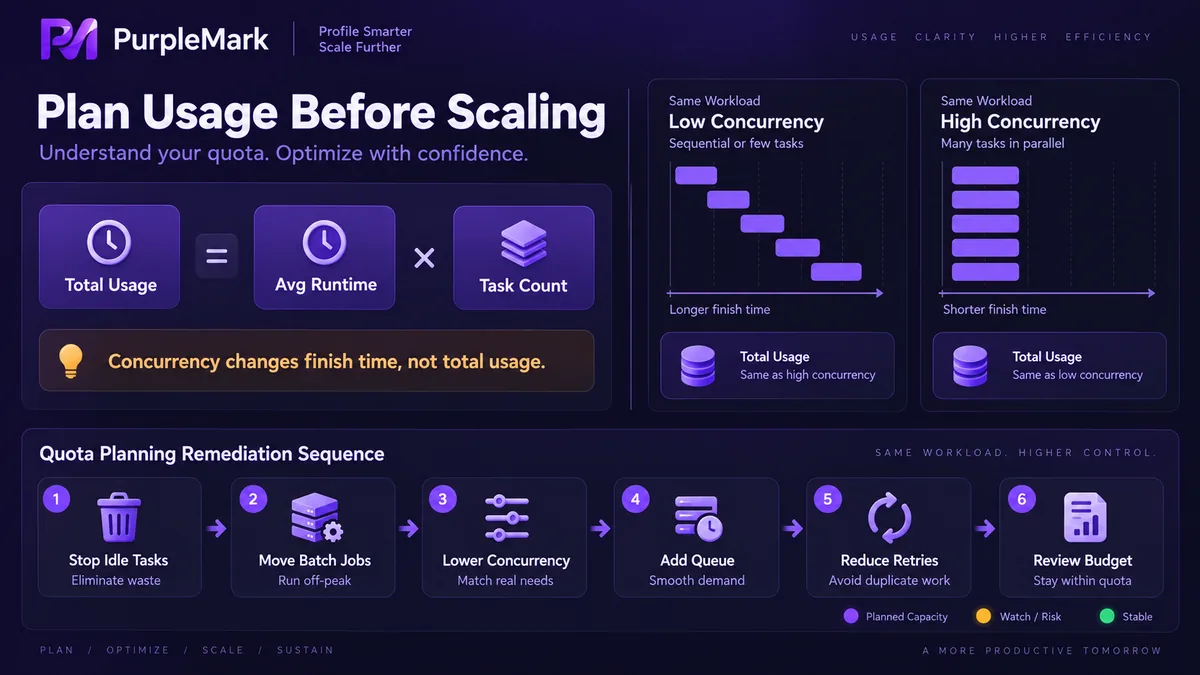
After these four steps, decide whether you still need a larger budget or a higher service tier. You will often find that the quota you actually need is smaller than you first assumed. Increasing the budget first, by contrast, also pays for inefficient habits.
Do not compress the environment layer along with compute
A common mistake when trying to save quota is making several tasks share one browser environment on the theory that starting one environment once should be enough.
The cost appears immediately: sessions overwrite each other, login state gets displaced, caches become mixed, and one failed task can drag down the others. The small amount of instance time saved is then paid back several times over in troubleshooting and reruns.
Treat these as two separate layers. The compute layer runs task logic, schedules work on demand, and optimizes for cost efficiency. The environment layer handles identity and isolation, with one independent environment per task, and optimizes for stability. Compressing the environment layer because compute is scarce mixes two different kinds of cost. Creating and recycling environments in bulk should be handled centrally by environment-layer tooling. With PurpleMark isolating sessions and caches by environment, upper-layer tasks and executors can be scheduled more freely.
One final reminder: do not cut costs by violating rules. Do not use unofficial services just to save quota, and do not try to force more throughput by increasing request frequency. Once rate limits are triggered, repeated retries usually consume more quota than running at a controlled pace.


