
Instagram has more than 2 billion monthly active users worldwide, and IG Shop lets brands and sellers showcase and sell products directly in the app. This guide explains eligibility, the five-step setup process, and practical ways to sell with product tags, Reels, and UGC.
Instagram has more than 2 billion monthly active users worldwide, so your potential customers may be everywhere. With IG Shop (Instagram Shopping), brands and sellers can showcase and sell products directly in the app, allowing users to browse, discover, and buy without leaving Instagram. This guide walks you through the entire process, from meeting the eligibility requirements to officially starting sales.
What can IG Shop do?
The core value of IG Shop is letting people shop while they scroll. Its main capabilities include:
- Product tags: Tag products in posts and Stories so users can tap to view details and proceed to purchase;
- Shopping page / Shop page: A mini e-commerce-style page that displays all products available for purchase in one place;
- Product detail pages: Show product images, descriptions, prices, and other information;
- Shopping ads: Use ads to send users directly to a product detail page or shop page;
- Live shopping: Showcase and sell products in real time through Instagram Live;
- Insights analytics: Provide shopping data to help you optimize your sales strategy.
Requirements before creating an IG Shop
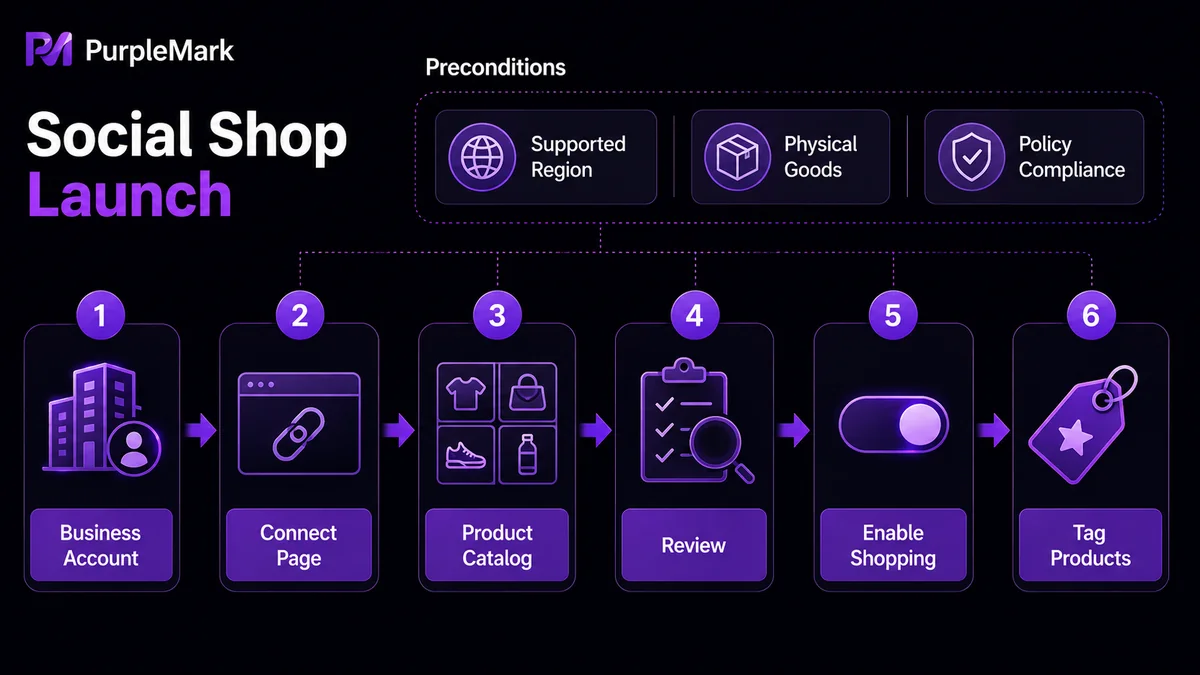
Before opening a shop, make sure your business meets Instagram's eligibility requirements:
- Your business is located in a region that supports Instagram Shop (check the list of supported regions in the official Help Center);
- You sell physical goods that comply with Instagram's commerce policies;
- You comply with Instagram's commerce and shop policies.
Create your Instagram Shop in five steps
Step 1: Convert your personal account to a business account Instagram → Profile → Settings → Account → “Switch to professional account.” Choose “Business” and enter your business and contact information.
Step 2: Connect a Facebook Page Go to your business profile → Edit business profile → Under publicly displayed business information, select “Page,” then choose the Facebook Page you want to connect (or create one if you do not have one).
Step 3: Create a product catalog You can manage your catalog through Facebook Shops or commerce platforms such as Shopify and BigCommerce. In Facebook Business Manager, go to “Business Settings → Data Sources → Catalogs,” create a new catalog, choose “E-commerce,” and then add product images, descriptions, and prices as prompted.
Step 4: Submit for review Instagram → Settings → Business → Shopping, then submit your account and product catalog for review. This usually takes a few days, and you will be notified of the result.
Step 5: Enable shopping features After approval, go to “Business → Shopping,” select your product catalog, and complete setup. You can then start tagging and selling products.
How can you sell more with IG Shop?
1. Make good use of product tags When publishing image or video posts, use “Tag products,” and use the “Product” sticker in Stories so users can reach the product detail page and purchase with one tap. Make sure tags do not cover important parts of the image.
2. Showcase products with IGTV and Reels IGTV works well for longer videos with detailed product introductions, tutorials, and use cases. Reels uses 60-second short videos with music and effects to highlight product benefits and usage scenarios. Its more entertaining and shareable format can significantly increase reach and engagement.
3. Improve your product detail pages The detail page is critical for conversion: clearly explain specifications, usage, and features; show genuine customer reviews, especially detailed experiences; provide high-resolution images from multiple angles; and support adding products to the cart.
4. Let users speak for you (UGC) Real customer experiences are often more persuasive than marketing copy. When users post photos of your products, send a direct message to request permission and thank them. Encourage them to use your brand hashtag to make resharing easier.
A reminder for operating multiple shops
If you run several of your own IG Shops or manage multiple client shops as an agency, Instagram closely monitors frequent switching among multiple accounts on the same device. A compliant approach is to create separate browser environments for different shops or clients (PurpleMark supports environment grouping and data isolation), so each shop signs in with a relatively stable device and network. This can reduce the risk of mistaken detection. Always use genuine business accounts as the foundation of your operations, and do not use batches of fake accounts to inflate followers or orders. For repetitive tasks such as scheduled publishing and content distribution, PurpleMark's RPA or window synchronization can improve efficiency, leaving more time for product selection and customer service.
Frequently asked questions
Can I sell products on IG? Yes. After enabling IG Shop, you can showcase and sell products within Instagram. Users can tap product tags or shopping stickers to view products and purchase them.
How can I promote an IG Shop and get more traffic? Use shopping ads, IGTV, and Reels to showcase and promote products; run UGC campaigns and encourage participation with rewards or giveaways; and work with relevant influencers to amplify your brand.
How should I handle orders and customer service? Orders, shipping, and payments are usually managed centrally through the connected e-commerce platform, such as Shopify or BigCommerce. Responding to customer inquiries promptly can help improve repeat purchases.


