
Every idle game's page says it keeps growing while you are offline, but the real differences are huge. This article shows how to judge one: whether offline catch-up is genuine, how much memory a background tab takes and how it is throttled, whether it must stay in the foreground, how strong the pressure to pay is, and whether there are social or versus modes. It then gives picks by four types.
Idle games all claim on their description pages that they keep growing while you are offline, but the real differences are enormous. Some people close the tab, come back and find progress has jumped a long way; others leave it running all night and find nothing has changed. Getting a few things straight before you choose is more useful than going straight to a ranking list.
First, confirm that it really progresses offline
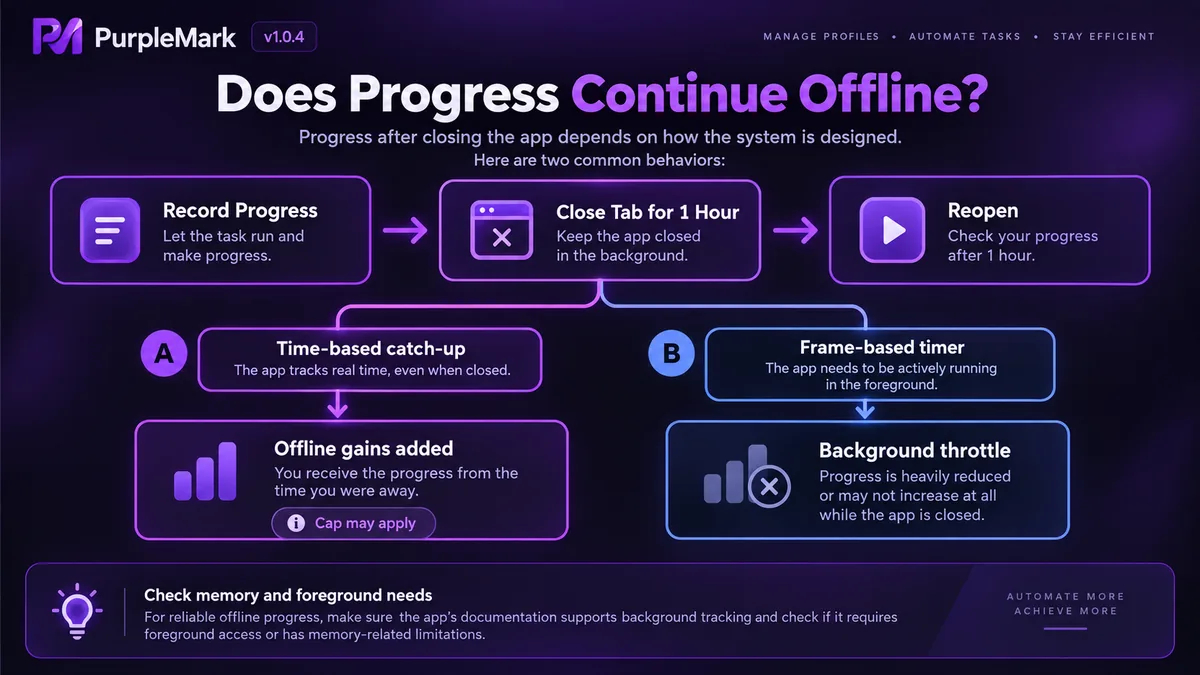
The test is crude but effective: note your current progress, close the tab, and come back an hour later. A game with genuine offline progress recalculates from a timestamp when it loads, and usually shows a summary box for what you produced while you were away. Other games rely on the browser's animation-frame clock, so the tab is throttled the moment it goes to the background and progress stops dead.
Also check the cap on catch-up. Many games set a ceiling on offline earnings, for example a maximum of some number of hours, with anything beyond that wasted. Opening the game once a day and leaving it alone over a long holiday require completely different kinds of game.
Memory and throttling in background tabs
A game tab left open for a long time commonly takes several hundred megabytes, and the more particle effects and rolling numbers the page has, the higher the usage goes. Browsers also reduce the update rate of background tabs, and once the frame rate drops, gameplay that depends on frame timing starts to report progress inaccurately.
The practical move is to give it its own window instead of mixing it with your work tabs, otherwise it is hard to tell who is to blame when the whole machine slows down. On a machine with limited memory, reloading the page periodically is more stable than leaving it running forever. Some games are restrained about this and automatically reduce rendering when the page loses focus; those survive long sessions better.
Does it need to stay in the foreground?
A purely waiting game loses little when you close the page, it just catches up a bit less; gameplay with combat, random events or real-time decisions has to stay somewhere you can see it. Before choosing, look for words like offline or background in the description or the comments, or simply leave it half an hour and watch how the progress bar moves.
This point directly decides which part of your day the game fits into. Tapping it a few times between tasks at work and having to keep a second device open to babysit it are two completely different levels of commitment.
How heavy the pressure to pay is
Most browser idle games are free with ads, or a one-time purchase that unlocks the full content. There are also versions wired into a platform's in-app purchases, where speed-up items, extra queues and doubled output belong to this category.
The test is straightforward: can the game still progress normally if you do not pay? If the core loop is designed so that you must pay to get past it, then it is not an idle game, it is a funnel waiting for payment. Conversely, a game where money only buys time can generally be played without worry.
Is there social or versus play?
Asynchronous versus designs are becoming more common: your team can be challenged by other players while you are offline. There are also games with guilds and chat, where you can see other people's progress and ranking while you idle. Designs like these clearly stretch out time spent online, and they bring social pressure and comparison anxiety. If you want to idle in peace, favour the single-player ones.
How to choose by type
The pure idle kind needs almost no input. Cookie Clicker is the most representative of these: you start by clicking, then progress through automation and upgrades, and production continues while the page is closed. A Dark Room is more extreme, with a text-only interface and a slow pace, unfolding bit by bit through resources and buildings; it suits a bedtime-reading style of play.
Incremental business games tie a commercial framework to numeric growth. AdVenture Capitalist wraps the growth loop in the structure of founding companies and hiring managers, with a clean interface that suits fragmented time. NGU Idle has much deeper numeric layers and a very long growth curve, so people who like studying mechanics will sink in further.
The representative text idle game is Universal Paperclips: it runs from paperclip output all the way to runaway scale, has a definite ending, and shows you the whole structure in a single playthrough. Cell to Singularity takes the evolution popular-science route, where you read knowledge cards while idling; slower than its peers, but with a high information density.
For the category that needs strategic input, idling is only part of the practice. Melvor Idle ties skill training to equipment planning, and both gathering and combat require ordering. Realm Grinder adds faction choice and base-building routes. The core of Clicker Heroes is team composition and prestige resets. Super Auto Pets is asynchronous versus play, where the placement of every round is a decision, and its pace is completely different from the previous ones.
The risk of scripting the idle part
There are auto-clickers, auto-collecting scripts and browser extensions on the market. Most games' terms of service explicitly forbid replacing human input with automated programs, and play with leaderboards or versus elements is especially sensitive; once it is judged to be automation, the response may be wiping your progress or even banning the account. The pleasure of idle games is in waiting slowly in the first place, so taking that risk to save a bit of clicking is not worth it.
How to place multiple accounts
Plenty of people run several accounts on one platform, or run several titles at the same time. If they are all signed in inside one browser, cookies, local storage and cache easily overwrite each other, and saves can get crossed; when something goes wrong it is very hard to trace. Putting different accounts into separate browser environments, with profiles and network egress kept apart from each other, is what PurpleMark provides: an account-level isolated environment, suited to situations where you need to idle long-term without accounts affecting one another.


