
The biggest trap with browser proxy extensions is scope: they only take over browser traffic, and can still fall back to a direct connection when no rule matches. This article groups extensions by use case, lists evaluation criteria such as protocol, authentication, permissions, and maintenance status, and gives self-test steps for checking your egress IP and WebRTC leaks.
A boundary of browser proxy extensions is often overlooked: they only take over requests made by the browser. System updates, desktop clients, and other apps keep using the original route. Figure out exactly what you want to proxy before choosing a tool, and you save a lot of troubleshooting later.
Start by splitting them into three use cases
The most common need is per-site switching: send a few domains through the proxy and let everything else connect directly. This scenario is controlled by a rule list, and the value of the extension lies in fast switching and per-domain routing.
The second type is a global proxy, where all browser traffic leaves through a single egress point. It is the simplest to set up, but the cost is direct: if the egress goes down, the browser is effectively offline, which makes everyday use unstable.
The third type is tied to an environment, where each browser profile is fixed to one egress and profiles do not affect each other. This is the approach used when running multiple accounts or several projects in parallel; the extension is more of a supplement here, because the egress itself is usually configured at a lower level.
What to look at when evaluating an extension
Protocol support comes first. HTTP and HTTPS proxies only handle TCP, while SOCKS5 is more general, but its support for UDP depends on the implementation, and many extensions either pass UDP straight through or drop it entirely. This matters later, because it is directly related to whether WebRTC leaks.
Look carefully at the authentication method. Username and password authentication is convenient, but credentials stored in the extension are kept locally in plain text or with weak encryption, so anyone else using the computer can read them; IP allowlist authentication stores nothing in the extension, at the cost of having to re-add the allowlist whenever you change networks.
Scope is where problems most often appear. In rule mode, domains that match no rule default to a direct connection, and you may not know which domains a page is actually requesting. Once an HTTPS site has established its connection, the extension can only see the domain, not the specific path, so the idea of routing by path basically does not work.
Take a look at the permission scope too. If a proxy extension also requests permissions to read data on all websites, access tab information, or reach the clipboard, ask whether those permissions have anything to do with the function it claims to provide. Manifest version upgrades for browser extensions are also tightening the available APIs, and some older extensions have been forced to change their architecture as a result.
For maintenance activity, do not look at how many changelog entries there are; look at whether anyone is keeping up with upstream changes. Among proxy extensions, the store version of Proxy SwitchyOmega has been delisted, and a community-maintained fork (such as the ZeroOmega line) took over subsequent adaptation; extensions like FoxyProxy have versions on multiple browsers. These are neutral examples only; which one suits you still depends on the points above.
The traffic it cannot cover
Once the extension is installed, the browser itself goes through the proxy, but other programs on the same computer, background update services, and some traffic inside the browser that does not follow the extension's request path may still use the local egress. Checking network consistency cannot rely on the extension panel alone. Full isolation has to be solved at the system proxy level or higher up.
Self-testing: check the egress first, then leaks
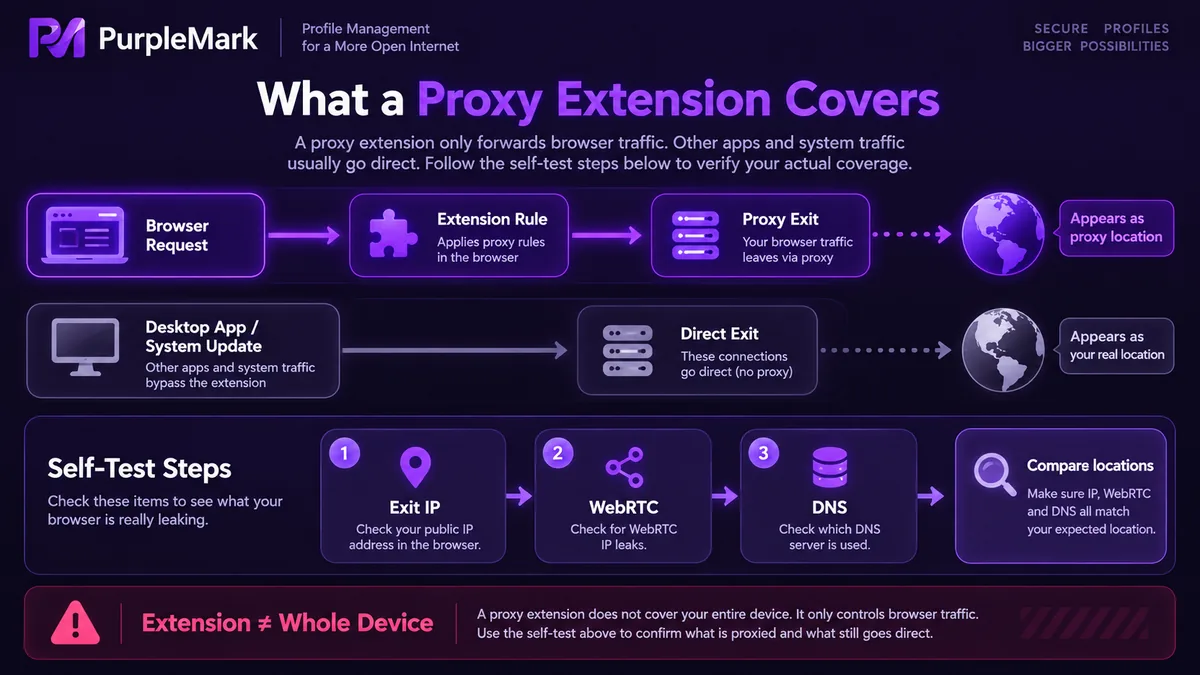
First, check the egress IP. Open a few pages that return your visiting IP and location, and check once in a normal window and once in a tab that matches your rules, then compare whether the results agree. If a rule specifies a proxy but the result is still your local address, the rule did not take effect or the domain did not match. Checking several sites reveals cases where only some requests go through the proxy.
Second, check WebRTC. Dedicated test pages list the local candidate addresses and public candidate addresses the browser obtains; if the public candidates show your real IP instead of the proxy egress, UDP traffic is not going through the proxy, and page scripts can still determine your actual network location.
Third, check DNS. If the location of the DNS resolver is very far from the location of the egress, some sites will treat the environment as anomalous.
The last step is to test once more in an incognito window. Many extensions are not active in incognito mode by default and must be allowed manually in the extension settings; forgetting this step leads to completely wrong conclusions.
Decide how to use it after testing
Self-test results are more reliable than an extension's documentation. Once the real egress, the DNS resolution location, and WebRTC exposure are aligned, decide whether to keep using the extension or to move the egress down to a lower level. In scenarios with multiple parallel environments, each environment is best given its own dedicated egress, fixed in place, rather than having several machines share one egress.


