
The pitfalls of free plans are usually at the quota boundaries: how many accounts you can connect, how many posts you can schedule per month, how far back reports go, and whether there are enough seats. Break it down by feature dimension, then decide when to upgrade to paid and when a spreadsheet plus native tools is enough.
The pitfalls of free social media management tools are usually not about how many features they have, but about where the free quota ends. At sign-up everything looks possible; two weeks later you find you cannot connect all your accounts, your scheduling slots are used up, and reports only cover the last few days.
Where free quotas usually run out
Limits differ between vendors, but they cluster around a few items:
- The number of accounts you can connect, counted across platforms combined; two or three is a common cap.
- The number of posts you can schedule per month; some count a total, others count by period, and anything beyond that has to be published manually.
- The data lookback window; free plans usually cover only a recent stretch, so quarter-over-quarter comparisons are out.
- Team seats; free plans often leave room for only one person.
- Branding; reports exported or content published on free plans may carry the tool's name.
Among these, account count and scheduling volume tend to become bottlenecks first, with report windows and seats after that.
There is also a category of limits that never appears in comparison tables: whether the same piece of content can be adapted to each platform's format separately. Vertical short video and square images differ in dimensions, duration, and hashtags. If a tool only offers one uniform layout, you end up going back to each platform to fix things by hand, and the time you saved is given right back.
Look at it by feature dimension, and work out what you are missing
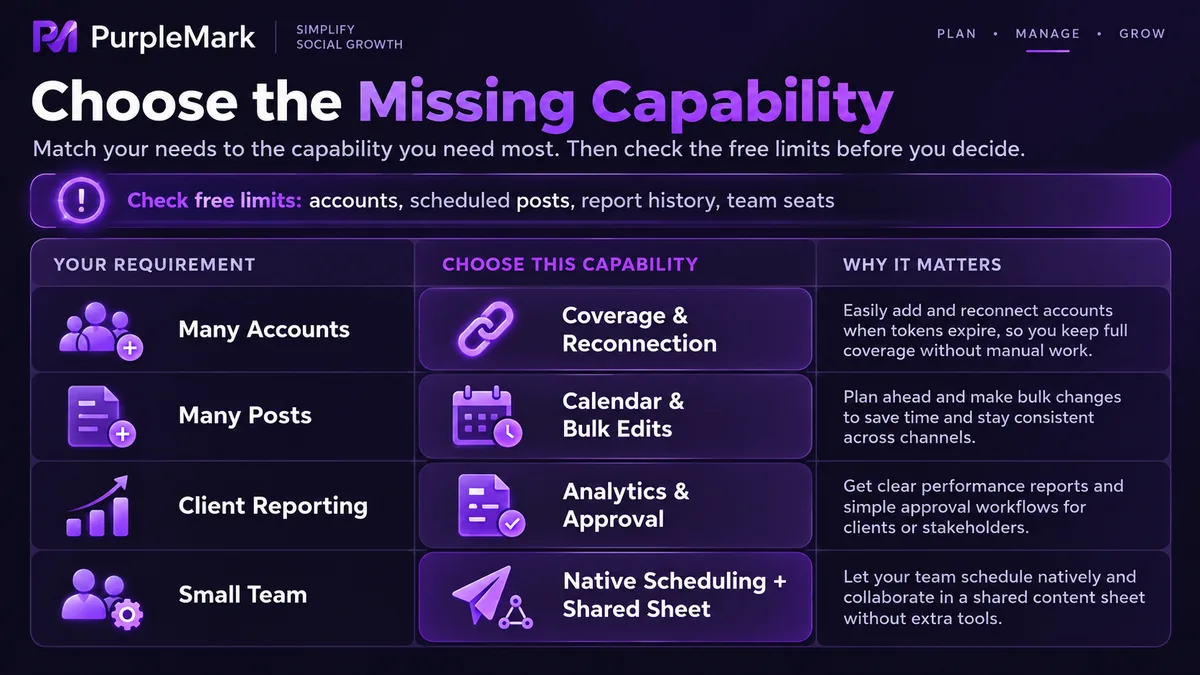
Multi-platform publishing is the baseline; almost every tool does it, and the difference lies in which platforms are supported and how painful it is to reconnect after authorization expires.
Content calendar and scheduling is the second block. A calendar you can drag and drop and bulk-reschedule makes daily work much easier; some tools go deep on scheduling while their calendar view is awkward to use.
Analytics is the third block. The value is in aggregate comparison beyond each platform's native dashboard, for example how the same post performs across several platforms. Free plans are generally conservative here.
Team collaboration and approvals is the fourth, and the one most likely to suddenly become a must-have: when a client or a manager wants to review a draft before publishing, comments, approvals, and version history have to keep up.
Representative products each lean somewhere different. Hootsuite started early, with relatively mature aggregation and reporting; Buffer's scheduling experience is simple and direct; Later is handy with visual content; Metricool and Vista Social have a good reputation for free-tier flexibility; Publer does more with content reuse and combinations. All of these need to be tried against your own platform mix, because someone else's list is only a reference.
The four dimensions do not all have to be strong; start with what you lack most. Many accounts but little content? The priority is aggregation coverage and stable reconnection after authorization expires. Lots of content but few hands? The priority is the calendar view and bulk operations. Accountable to clients? The priority is reports and approval records. Just posting for yourself? Smooth scheduling is enough.
These are the signs it is time to upgrade
Your client count exceeds the account cap, so you keep logging out and back in; you need an approval flow and the free plan simply does not offer one; you have to deliver reports to clients but they carry another company's branding; you want to review data from three months ago and cannot pull it up.
Before paying, be clear about which item you are paying for. Paying only for more accounts is a different purchase from paying for aligned reporting, so pin down the most painful item first and compare from there.
Switching tools also has migration costs. Historical content, report data, and approval records generally do not come along, and you have to rebuild your content library and tags in the new tool. So even while you are on a free plan, organize assets and naming according to your own logic, and moving later will be much easier.
Some teams do not actually need to upgrade
If you run only one or two accounts, post infrequently, and have just one or two people, the platform's built-in scheduling plus a shared spreadsheet is enough. Put the content, timing, and copy in the sheet, pair it with phone reminders, and the cost is zero, and it is more flexible to adjust.
A self-built process is not a low-end option either. For teams with small content volume, a need for human review, and publishing times that depend on judgment, a spreadsheet is often smoother than a scheduling tool, because you do not have to change how you work to accommodate a tool's template.
Expired authorization and login cross-talk
When a platform changes its API or password, connections inside the tool break, scheduled tasks fail silently, and nothing goes out until someone notices. Checking each account's connection status at intervals saves more trouble than backfilling later.
The other issue is account cross-talk. Switching repeatedly between different clients' back ends on the same computer means login state, cookies, and cache easily overwrite each other, and sometimes trigger the platform's unusual-login alerts. Operating each account in an isolated browser environment is more stable, and that is the kind of environment isolation PurpleMark provides. The tool handles content, the environment handles logins; separating the two makes everything much smoother.


