
Chrome and Chromium share the same engine, and the differences come down to codec licensing, DRM components, automatic updates, telemetry and account services. This walks through the release cadence and licensing differences of the two item by item, and sets out what everyday users and people who need a clean engine should each choose.
Chrome and Chromium look almost identical — the menus, keyboard shortcuts and extension system all line up — so it is a little surprising the first time you hear that they are not the same thing. What separates them is the invisible part: codec licensing, DRM components, update channels, telemetry and account services.
One is a project, the other is a product
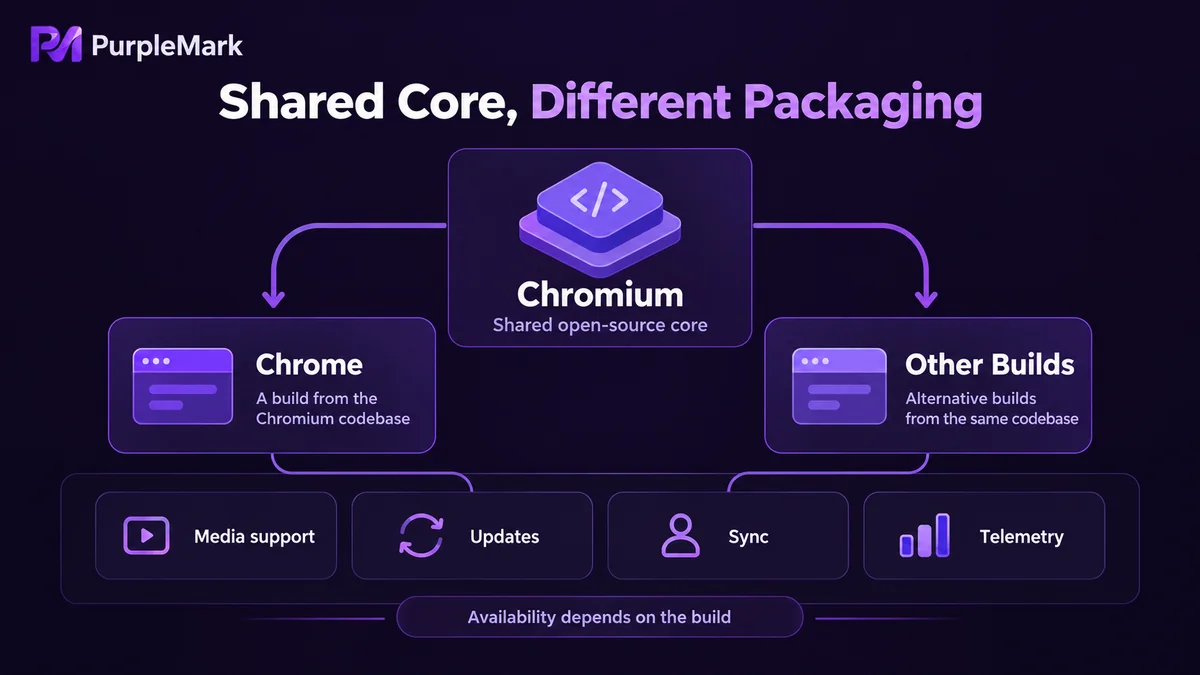
Chromium is an open-source project, open-sourced in 2008 together with Chrome, with its code hosted in its own repository. It has no official release in the formal sense; what you can download are continuously built snapshots whose version numbers follow the trunk. Chrome is a product Google packages on top of that project after adding things to it: it has branding, a release cadence, a policy and customer support system, and it also carries the cost of licensing and compliance.
Codecs and DRM
Open-source components are constrained by patents and licensing, so the official Chromium builds generally do not include proprietary codecs such as H.264 and AAC, nor Widevine DRM. The result is that some video sites open but will not play, and streaming services such as Netflix and Spotify refuse to play outright. Chrome pays the licensing fees and puts all of this into its distribution. Linux distributions, however, often fill in decoding capability with the system's own ffmpeg, so “Chromium cannot play video” is not absolute — it depends on the specific build.
Update method and release cadence
Chrome comes with an updater built in and upgrades silently in the background, something users barely notice. The stable version advances a major version roughly every four weeks, and there are also Canary (daily), Dev and Beta (weekly) channels that developers who want to try new features early can switch to. Chromium has no official automatic updates: new snapshots have to be downloaded and overwritten by yourself. Its trunk cadence is roughly in sync with Chrome, but there is no branded stable branch, so which date's build you use is entirely up to you.
Version differences matter a great deal when doing compatibility testing: Chrome's version number is unambiguous, while a Chromium snapshot only has a commit date, making it hard to align environments when something goes wrong.
Automatic updates are not only about convenience; they also determine when security patches arrive. Chrome's vulnerability fixes ship with the stable release, and users upgrade without noticing. People who use Chromium have to watch security advisories themselves, judge whether the build in hand includes the fix, and then decide when to move to a new snapshot. That gap in between is the risk exposure.
Telemetry, sync and accounts
By default Chrome sends back crash reports and usage statistics, and after signing in to a Google account, bookmarks, passwords, history and extensions all sync. Chromium does not include these services: no account sign-in entry point, no sync backend, and crash reports are not sent by default either. Incidentally, features that depend on Google services such as geolocation, spell check and translation will fail or be degraded in Chromium because there is no built-in API key.
Everyday users and people who tinker with the engine
Ordinary users have no reason to switch to Chromium. The little bit of telemetry data saved costs you videos that will not play, bookmarks that do not sync and security updates you have to watch yourself — not worth it. It only makes sense if you clearly do not want to connect to Google services. Installing Chromium and then complaining that streaming will not open is the most common source of disappointment.
Conversely, people who need a clean engine more often choose Chromium. When doing front-end compatibility validation, you want to determine whether a problem lies in the standard engine or in a vendor patch; when writing automation scripts, you want the version locked down and not scrambled by automatic upgrades; and people building custom distributions and doing secondary development cannot do without its open-source license. The trouble usually is not the engine itself, but the missing licensed components and version drift. This is also why many people install both: Chrome for everyday browsing, and a pinned version of Chromium for testing and running scripts.
What “based on Chromium” tells you
When a browser says it is based on Chromium, what you can be sure of is that the rendering engine and JavaScript engine are the same, and that page behaviour, extension interfaces and debugging protocols are broadly identical. What you cannot be sure of is the privacy defaults, the sync backend, the telemetry policy or the update channels — nor how many versions behind upstream it is. Do not judge a browser on that one sentence alone; look at what it changed on top of upstream and what it removed. By the same logic, comparing Chrome and Chromium should not stop at whether the interfaces look alike; what is worth comparing is the parts that are installed or not, that connect or not, and that update themselves or not.


