
Connecting AI to cross-border operations often turns into a pile of tools that still need manual handoffs. Splitting work across product research, content, customer service, and data analysis—and separating accounts and environments—creates a much more stable workflow.
The most common failure in cross-border operations is not choosing the wrong tools. It is running every tool in the same environment, on the same computer, and in the same browser. Product research, content creation, customer service, and data analysis need different tools and often different account identities. Mixing them together compounds the problems.
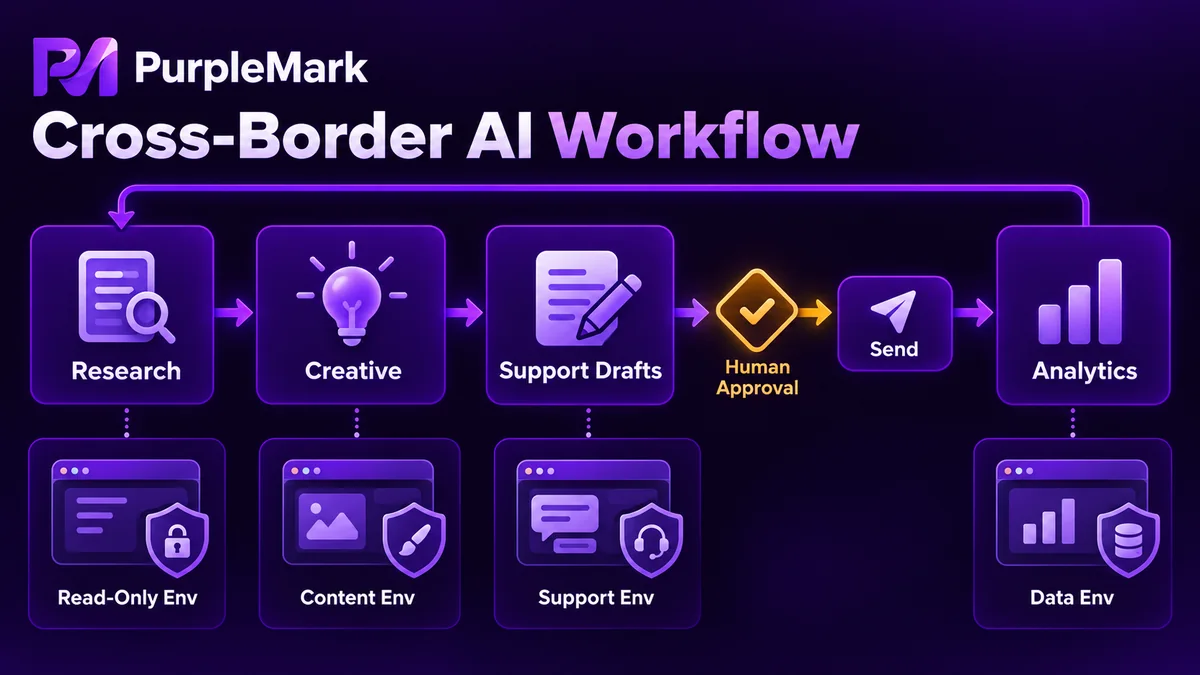
Product research: tools that can read pages and return structured results
This stage needs web search, page-reading, and summarization capabilities. The tool should be able to read product pages, reviews, and rankings on target sites and organize public information into tables, such as price-band distribution, frequently mentioned complaints, and competition density within a category.
Set the boundaries first. Follow each target site's robots rules and terms of service, do not collect personal information, control request frequency, and avoid disrupting normal service. Research is read-only, so its environment requirements are relatively flexible. However, the exit region should match the target market; otherwise the pages, prices, and inventory you see may differ, making the conclusion itself unreliable.
Content production: one source, rewritten for multiple platforms
Copy, images, and short-video scripts are well suited to generative tools combined with a templated process. In multi-platform operations, the time-consuming part is usually not writing the first version, but adapting the same product material for Instagram, X, and LinkedIn, each with a different tone and length. Let the model handle the rewrites and have a person review the final version.
The assets themselves also need one consistent home. Keep images and videos in the same workspace so they can be referenced directly during publishing instead of being passed back and forth between tools or repeatedly searched for by version.
Customer service and email: draft only, a person sends
Replies and customer-service scripts are suitable for models that can read context, but the workflow must stop at the draft stage. Anything involving commitments, returns, exchanges, or pricing should be reviewed by a person before it is sent. Once sent, it speaks for the account, so this checkpoint cannot be removed.
This stage uses account identities, so its environment should be separated from the others. The environment containing customer-service accounts should not run scraping tasks or bulk publishing. Once identities are mixed, one anomaly on the support side can affect operations elsewhere.
Data analysis: structure first, then look for trends
Archive publishing results, reach, engagement, and conversions by day, platform, and account in tables rather than keeping only piles of log text. Logs are useful for troubleshooting, but not for answering which content works or which account is deteriorating. The output from this layer should feed back into product research and content creation as input for the next cycle.
It is possible to run preparation, publishing, and review continuously in one workspace. It may look like one uninterrupted conversation, while different tools still perform separate jobs behind the scenes and pass status and results between them.
How to divide accounts and environments
This is the layer that requires deliberate design. The core rule is simple: do not place every tool in the same environment.
- Give each business line a relatively fixed environment with its own exit, coordinated timezone and language settings, and separate local data. Keep content, advertising, and customer-service accounts in different containers
- Use different environments for different kinds of operations. Mixing read-only collection, account operations, and bulk publishing can cause sessions and login states to interfere with each other, allowing one anomaly to affect everything
- Bind environments to accounts consistently and keep records of who used them and for how long, so handoffs and troubleshooting have a clear basis
Once the number of environments grows, manually opening windows and tracking account bindings is no longer practical. PurpleMark provides isolated environments and batch-management capabilities. Each account can stay fixed to one environment, environments can be launched by group, and status can be queried, turning environments and exits into schedulable resources.
One more boundary should be explicit: tools should stop at drafts by default, while the publish button remains in human hands. This is not unattended matrix-style account control. What gets published, when it is published, and how each account is used remain the user's responsibility, including compliance with platform rules and automation limits.
Do not connect all four stages at once
Start with one clearly defined task that repeats every day and make it work end to end. First validate environment stability; completeness is not the goal at this stage. Then let a model that can plan steps drive the process and observe how reliably it handles exceptions. Add the structured-data layer next, and only then expand to the other stages on top of the same environment and data foundation. This way, adding a new stage does not require rebuilding environment management or data storage, and the benefits of a layered design become visible.
Differences between tools usually matter less than differences in how the environments are arranged.


