
Off-the-shelf MCP Servers expose primitives, so business actions still have to be assembled and re-evaluated by the Agent. A thin Flask adapter can centralize tool declarations, request routing, execution results, validation, and error semantics.
When you connect a browser environment to an AI Agent, one issue is unavoidable: standard tools provide primitives, while business actions still have to be assembled yourself.
Take a concrete example. To complete one collection run, the actual flow is to “start an environment for a region, bind the outbound connection, visit once to warm it up, and confirm the outbound connection works,” and only then hand it to the Agent. An off-the-shelf MCP Server usually exposes only single-step tools such as starting an environment, navigating, clicking, and taking screenshots. Nobody assembles the sequence above for you. The Agent has to work it out from scratch every time, which is slow, and it must decide what to do whenever any intermediate step fails.
That is what an adapter layer is for: keep the composition logic, validation, and state on your side, and expose only one business action externally.
Minimum viable structure
A working adapter layer needs only three parts: tool declarations, request routing, and execution with results. With Flask, one process can contain all of them.
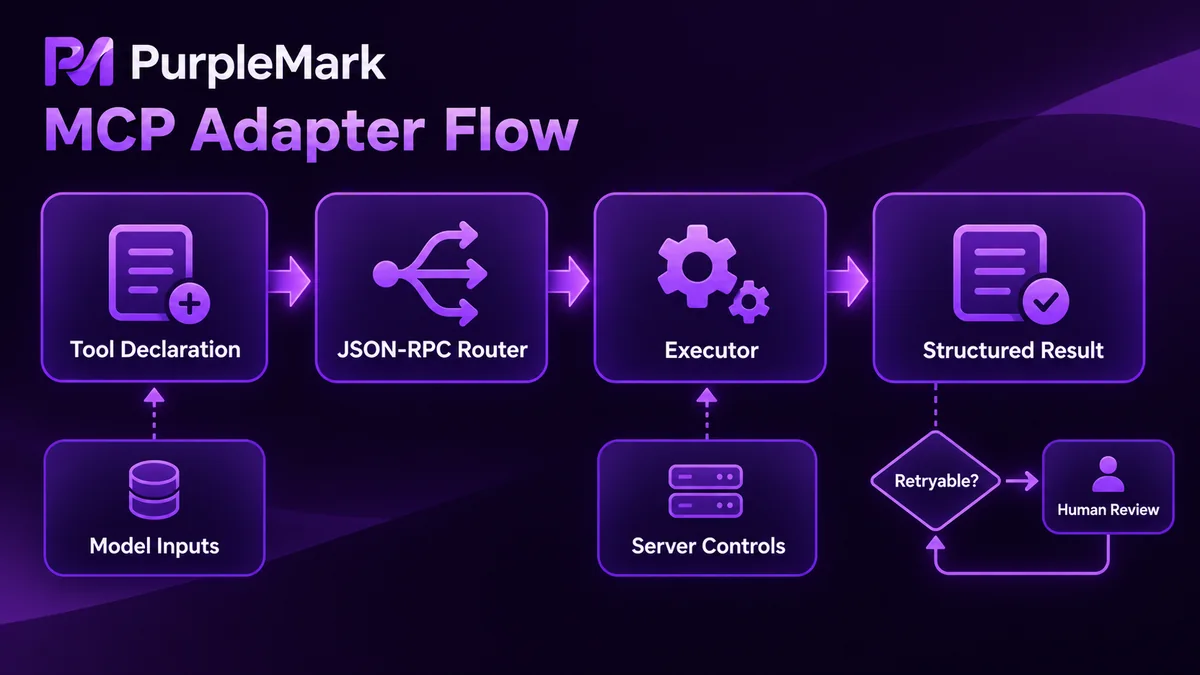
Start with the tool declarations; they determine what the Agent can see.
# adapter/tools.py
TOOLS = [
    {
        "name": "prepare_environment",
        "description": "Prepare an available environment for a region and return the environment ID",
        "inputSchema": {
            "type": "object",
            "properties": {
                "region": {"type": "string", "description": "Outbound region, such as US-CA"},
                "purpose": {"type": "string", "description": "Purpose label for reuse and quota statistics"},
                "timeout": {"type": "integer", "minimum": 10, "maximum": 120, "default": 60},
            },
            "required": ["region"],
            "additionalProperties": False,
        },
    },
    {
        "name": "open_page",
        "description": "Open a page in the specified environment and wait until it is interactive",
        "inputSchema": {
            "type": "object",
            "properties": {
                "env_id": {"type": "string"},
                "url": {"type": "string"},
            },
            "required": ["env_id", "url"],
            "additionalProperties": False,
        },
    },
]
The router dispatches JSON-RPC methods. The client first asks for tools/list, then calls tools/call by name.
# adapter/app.py
from flask import Flask, request, jsonify
from adapter.tools import TOOLS
from adapter.runner import run_tool

app = Flask(__name__)

@app.post("/mcp")
def mcp():
    req = request.get_json(force=True)
    method, rid = req.get("method"), req.get("id")

    if method == "tools/list":
        return jsonify({"jsonrpc": "2.0", "id": rid, "result": {"tools": TOOLS}})

    if method == "tools/call":
        name = req["params"]["name"]
        args = req["params"].get("arguments", {})
        return jsonify({"jsonrpc": "2.0", "id": rid, "result": run_tool(name, args)})

    return jsonify({"jsonrpc": "2.0", "id": rid,
                    "error": {"code": -32601, "message": "method not found"}})
The execution layer is the only place that touches the environment API and page protocol. Multi-step sequences are completed here, and failures are converted here into one consistent format.
# adapter/runner.py
def run_tool(name, args):
    try:
        payload = HANDLERS[name](**args)
        return ok(payload)
    except ToolError as e:
        return fail(e.code, e.retryable, e.message)
It is worth deciding the return format early. Do not pass raw low-level exceptions to the Agent; it will try to parse those strings and may make strange decisions. Agree on a result structure with a status code, such as {"ok": false, "code": "env_unavailable", "retryable": true, "attempts": 3}. Then the Agent only needs to answer two questions: can it retry, and should it hand the case to a person?
How to design parameters
Choose tool granularity around business actions, not around APIs. Wrapping every low-level endpoint as a separate tool is effectively no abstraction at all; the Agent still has to order the steps itself.
There is a clear boundary for parameters: what the model should decide, and what the adapter layer should decide itself. Region, purpose, and target URL belong to the first group, so let the model provide them. Debug ports, internal queue names, and which environment pool to use belong to the second group; do not put them in the schema, because sooner or later the model will fill them incorrectly.
Selectors are an easy source of trouble. When a page structure changes, calls hard-coded to selectors can fail in batches. Let the model pass semantic targets instead, such as relatively stable identifiers like a login button, and keep the selector mapping inside the adapter layer. Then one change is enough when the page changes.
Numeric parameters must have upper bounds. If timeout, retry count, or pagination count has no maximum in the schema, the model may pass a very large value and turn one call into a task that runs for more than ten minutes. Any tool with loop semantics needs an explicit end condition. Use a field such as max_pages to cap the work instead of saying “keep paging until there is no more data.”
Idempotency also matters. Have the caller provide a task_id; repeated requests can return the previous result directly, avoiding a second environment being created when the Agent retries.
Keep return values small. Do not return screenshots as base64; return a file reference. For list results, include a count and a truncation flag instead of putting the entire table into the context.
Watch these three areas first when debugging
With stdio, JSON-RPC owns stdout, so logs must never be written to stdout. A casual print can immediately break protocol parsing and leave you debugging for a long time. Send logs consistently to stderr or a file.
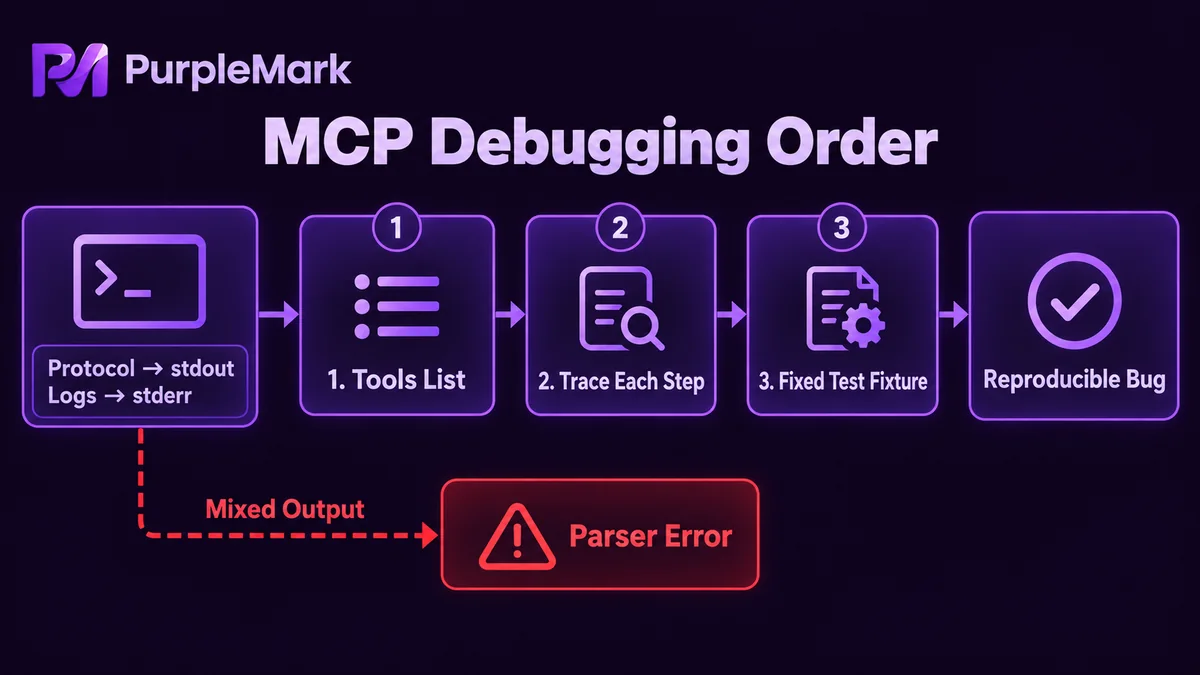
tools/list is the first checkpoint. If the declarations are not loaded, none of the later calls will happen. First confirm the tool names, schema structure, and whether additionalProperties is blocking any parameters.
The second checkpoint is step-by-step tracing. Record the task_id, a parameter summary, elapsed time, and result code for every call. When something goes wrong, you can see whether it stalled while creating the environment, navigating, or validating. Save the original parameters for failed cases so they can be replayed exactly—a reproducible bug is much faster to fix.
The third checkpoint is a set of fixed fixtures: one stable test page with several element locators that do not change. Run a smoke test after every adapter change; it is more efficient than any verbal verification.
Permission boundaries
The adapter layer is where permissions are most concentrated in the entire system: credentials, environments, and page operations are all in its hands, so the boundary has to be enforced there.
Keep credentials in server-side configuration, not in tool parameters or the model context. Separate tools by risk level: read-only tools such as screenshots and text extraction are enabled by default; write tools such as clicking, submitting, and deleting are disabled by default and temporarily enabled for a task. This limits the damage even if the model makes a bad decision.
Isolate environments by purpose. Different accounts and different tasks should use different environments; do not mix them in one environment. In multi-account management scenarios, environment creation, outbound network binding, and state maintenance can be handled by a dedicated environment layer. Tools such as PurpleMark separate this layer, while the adapter layer handles only business composition and validation.
Keep audit logs. You should be able to export by time which task used which environment and which write tools it called. When something actually goes wrong, this record is the only way to reconstruct what happened.
Finally, the hard boundary: the adapter layer should not expose any path for bypassing platform rules. Do not package actions such as bulk registration, bypassing verification, or forging identities as tools, even under the label of internal tools. Once a tool is exposed to the model, calls can happen automatically; there is no reliable place to block them beforehand, and the damage cannot be undone afterward.
For protocol versions and field definitions, refer to the official MCP documentation.


