
Meta Ads is the advertising system behind Facebook and Instagram. This guide explains the relationship between Meta Ads and Ads Manager, the three-step workflow from creating a campaign to optimizing creatives, and compliant ways for advertising teams to manage multiple ad accounts.
Open Facebook or Instagram and you will see ads almost every day. From cross-border e-commerce and independent stores to app promotion, most of these ads come from the same system—Meta Ads. Many marketers who are new to overseas advertising assume that opening an ad account is enough to start. Once they actually begin, however, questions quickly appear: how should campaigns be created, how should audiences be selected, how should budgets be set, and what exactly is the relationship between Meta Ads and Facebook Ads?
Meta Ads is not simply a "backend for publishing ads." It is a complete advertising platform covering ad creation, audience management, data analysis, and performance optimization. Understanding its delivery logic helps you avoid common mistakes and makes later ad optimization and budget scaling much easier.
What Is Meta Ads?
Meta Ads is the official advertising platform launched by Meta (formerly Facebook), helping businesses, brands, creators, and individual advertisers run ads across multiple Meta products.
Its biggest feature is create once, distribute across multiple channels: one campaign can run simultaneously on Facebook, Instagram, Messenger, and Audience Network. Advertisers do not need to create separate ads on each platform. They only need to create the campaign once in Meta Ads Manager, and the system can automatically distribute it across placements based on the advertising objective for unified management and optimization.
What Is Meta Ads Manager?
Simply put, Meta Ads is the overall advertising system, while Ads Manager is the official backend used to manage and run it. Whether you want to create Facebook ads or Instagram ads, setup, publishing, and ongoing optimization are all handled through Ads Manager.
For advertisers, Ads Manager is more than a tool for "publishing ads." It is the management center for the entire advertising lifecycle—creating ads, setting budgets, selecting audiences, analyzing data, and optimizing delivery all happen here.
Access tip: the official Ads Manager entry is
adsmanager.facebook.com. You can also open it from "All tools" in the left menu of Meta Business Suite (business.facebook.com).
How Do You Run Ads with Meta Ads Manager?
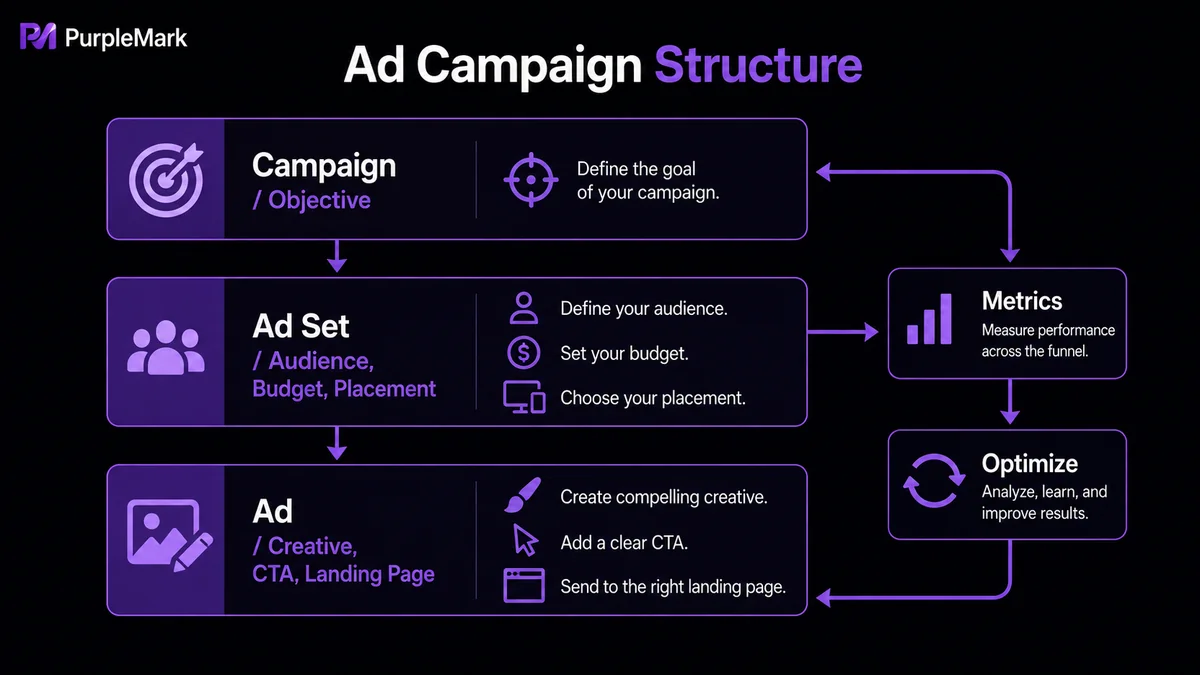
The core advertising workflow can be divided into three steps: clarify "why you are advertising," decide "who to show it to and where," and create "what users will see."
Step 1: Create a Campaign — Define the Advertising Objective
When creating an ad, Ads Manager first asks you to choose a Campaign Objective. The objective determines which kinds of users the system prioritizes for delivery, so it should be chosen according to actual business needs rather than personal preference. Common objectives include:
- Sales: e-commerce conversions, purchases, and add-to-cart actions.
- Leads: collecting forms, inquiries, and lead information.
- Traffic: driving clicks to a website or landing page.
- Engagement: post likes, Page follows, and Messenger/WhatsApp conversations.
- Awareness: increasing brand exposure and reach.
A Shopify store whose goal is to sell products will usually choose Sales; a SaaS company is often better suited to Leads; and a new brand can start with Awareness or Traffic to build an initial audience before gradually optimizing for conversions.
Step 2: Set Up the Ad Set — Decide "Who to Target and Where to Show It"
This step determines how the ad is actually delivered and usually requires the most ongoing optimization. First choose where the conversion will happen (website, app, Messenger, or WhatsApp), then set a daily or lifetime budget and schedule the delivery period.
Next comes audience setup. Basic targeting includes country, region, age, gender, and language, and can be layered with interests, behaviors, occupations, and other criteria. After enough data has accumulated, you can further use Custom Audiences and Lookalike Audiences. Custom Audiences use website visitors, purchasers, or email lists for remarketing, while Lookalike Audiences find new users who share characteristics with high-value customers. They are often more likely to generate stable conversions than starting entirely from scratch.
For placements, beginners do not need to manually select them one by one. You can use Advantage+ placements and let the system distribute ads across better-performing locations such as Facebook, Instagram, Messenger, and Audience Network based on historical data. Manual adjustments, such as running only on Instagram Reels, are more appropriate after you have stable data or clear evidence that a specific placement performs better.
Step 3: Create the Ad — Decide "What Users Will See"
A strong Meta ad usually contains image or video creative, an ad headline, primary text, a landing-page link, and a call-to-action button (CTA). Meta supports formats such as single image, video, Carousel, Collection, Reels, and Stories.
Many ads have low click-through rates not because of delivery settings, but because the creative fails to capture attention in the first few seconds. Instead of packing every product feature into one image, highlight one compelling selling point, such as a limited-time discount, a core feature, or a problem users care about most. What the ad promises should also be reflected on the landing page. Avoid sending every ad back to the homepage, as that can cause unnecessary drop-off.
Also, do not prepare only one set of creatives. Mature teams usually launch several combinations of images, videos, and copy at the same time, let the system test creative performance automatically, and then keep the versions with higher click-through and conversion rates instead of repeatedly editing a single ad. Ads are reviewed before going live, and after launch you should continuously monitor click-through rate, conversion rate, and customer acquisition cost, then optimize audiences, budgets, and creatives based on the data.
How Can Advertising Teams Manage Multiple Meta Ad Accounts Compliantly?
One ad account is enough for many individual sellers, but once a business operates multiple brands, runs agency campaigns, or serves several country markets at the same time, the number of accounts often grows. This is a legitimate business need: many teams place different brands, product lines, or country markets in separate ad accounts to simplify reporting and budget control. They may also prepare multiple accounts to spread operational risk so that one account being restricted by review or risk controls does not stop the entire advertising operation. For agencies, it is also common for one operator to manage the Business Managers and ad accounts of many clients at the same time.
As the number of accounts grows, environment linkage becomes an unavoidable issue. Meta can use browser fingerprints (User-Agent, Canvas, WebGL, Cookie, and more), IP addresses, and network environments to identify account relationships. If one account violates rules and is suspended, other accounts used in the same environment can be affected as well. The following situations can increase linkage risk:
- Logging into multiple ad accounts in the same Chrome browser and simply switching between them frequently;
- Mixing Cookie, cache, and local-storage data;
- Having multiple accounts share the same proxy IP or frequently changing IP addresses;
- Using exactly the same browser fingerprint parameters across all accounts.
For teams that operate multiple BMs or ad accounts over the long term, the industry more commonly recommends "one account, one isolated environment" so that each account has a separate login environment. This usually means:
- Independent browser environment: each account uses a fixed browser environment, with its Cookie, local storage, and login state saved separately instead of sharing one Chrome profile.
- Stable network environment: each account stays bound to a fixed proxy IP over time, preferably aligned with the actual operating market, without frequently switching regions.
- Consistent fingerprint over time: avoid having multiple accounts permanently share identical device characteristics, and avoid constantly changing the environment. Long-term stability is usually more important than repeatedly trying to "disguise" it.
It is important to emphasize that this refers to advertising teams or agencies compliantly creating and isolating separate ad accounts for different brands, clients, and markets—an organizational model supported by the Meta Business ecosystem—not individuals trying to circumvent platform rules by "warming up" accounts. Whether you operate multiple accounts and how you organize them should always follow Meta's business conduct rules, use genuine business entities, and truthfully declare business activity.
Compliant Practices for Managing Multiple Ad Accounts with PurpleMark
Putting "one account, one isolated environment" into practice is difficult if you rely on manually creating many Chrome profiles. PurpleMark is designed for this kind of multi-account environment management and team collaboration. In its web workspace, you can centrally create and manage browser environments, configure proxies, Cookies, startup pages, and browser fingerprint parameters for different business accounts, and organize daily operations with grouping, sharing, transfer, member permissions, operation logs, window synchronization, RPA, and other features. For teams running multiple BMs, ad accounts, and regional advertising operations, PurpleMark functions more like a complete multi-account workspace solution:
- Independent environments: each browser environment has separate fingerprint parameters and can be bound to a fixed proxy IP, helping different Meta ad accounts remain isolated and reducing environment-linkage risk.
- Grouped management: environments can be categorized by brand, client, country, BM, or ad account, making them easier to find and switch between. Multiple accounts can stay online simultaneously without frequent sign-ins and sign-outs.
- Team collaboration and permissions: members, roles, authorized groups, sharing, transfer, and operation logs make it clear who can access which environments and who performed each action. This avoids repeatedly passing account passwords around and reduces unclear responsibility, making it suitable for agencies and multi-person operations teams.
- Automation: window synchronization or RPA can be used for repetitive workflows such as opening environments in batches, logging in, uploading creatives, and initializing ads, reducing manual effort.
Compliance note: PurpleMark is only intended to help legitimate businesses and agency teams efficiently isolate and manage independent business and advertising accounts that they lawfully own or operate. Register accounts with genuine entities as required by Meta, truthfully declare advertising activity, and do not use any method to bypass platform reviews or platform rules.
Frequently Asked Questions
How do I access Meta Ads Manager?
The official Ads Manager entry is adsmanager.facebook.com. First-time users need to sign in to a Facebook account and create Meta Business and an ad account. If you already have an account, you can sign in and directly create ads, manage budgets, and view data.
Is Ads Manager free? Yes. Creating and using Ads Manager itself is free. You are charged only when your ads start running and incur actual spend. Even if you do not plan to advertise immediately, you can still familiarize yourself with the interface in advance.
Can I run Meta Ads without a website? Yes. Ads can direct users to a Facebook Page, Instagram profile, Messenger, WhatsApp, or collect information through Meta's built-in Lead Ads forms. However, if your goal is e-commerce sales or long-term customer development, having an independent website is more helpful for data tracking, brand building, and performance optimization.


