
The Agent makes decisions, Playwright performs browser actions, but the environment layer is often overlooked. In long-running collection jobs, failures tend to concentrate there.
When an Agent framework drives a browser for data collection, the architecture usually has three layers: the Agent plans and makes decisions, Playwright handles clicks, input, and data extraction, and the workflow ultimately interacts with the target site. Short jobs often run smoothly and pass local tests. Once the runtime grows and tasks scale out, failures start clustering in a place that rarely gets enough attention: the browser environment.
Looking back at problems encountered in practice, environment-layer failures generally fall into three patterns.
The environment is flagged, and the whole pipeline stops
One case is that the platform acts on the environment itself. The result is often not an outright block but a downgrade: simplified pages, empty results, or verification challenges. The script does not throw an error, yet the returned data is no longer useful. Downstream steps keep running as usual, carrying the bad data all the way into the final table.
The difficulty is that these environments are often shared by multiple tasks. If one environment develops a problem, every task attached to it can stop. Retrying does not help because the root cause is not in the script.
Several tasks share one environment, and sessions bleed into each other
When tasks run concurrently in the same browser instance, Cookie, localStorage, and IndexedDB data can overwrite one another, pushing out login states. It may not be obvious at first, but after a few days you can start seeing unexplained requests to sign in again.
There is also a subtler kind of drift. In a long-running browser, cache, storage, and even WebGL rendering state gradually accumulate changes. The same environment can have different characteristics today than it does three days later. Many people assume the Cookie has expired, when in fact the environment itself is no longer the same. This is also why treating environments as persistent, reusable objects is more efficient than starting a fresh browser every time.
On resume, the original environment may no longer be usable
Collection jobs rarely finish in one run. Resuming from a checkpoint after an interruption is common, and it is also where work is easily wasted: restarting the script may casually create a new browser instance and lose the login state; or the old environment may be reused even though the platform has already flagged it, so continuing only consumes more resources.
The key is not really the retry count but the granularity of recovery. If the current task step, the data already collected, and the environment being used are not recorded somewhere outside the script, a restart can only begin from scratch.
What to do at the environment layer
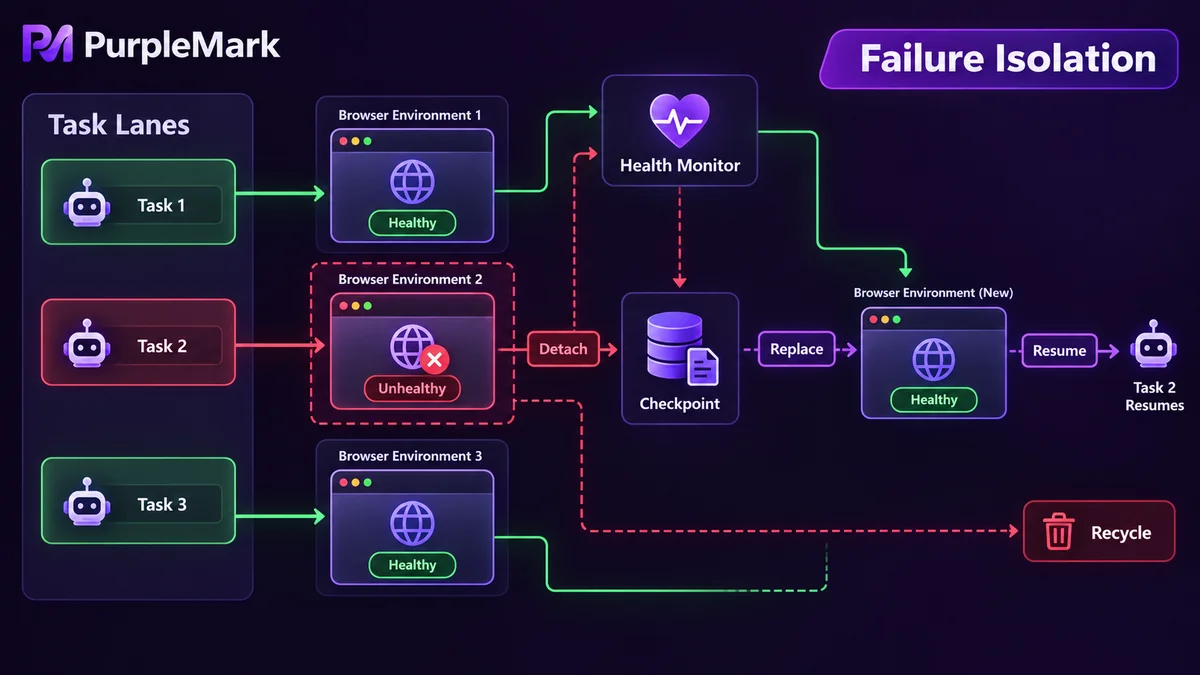
Put these three issues together and the approach comes down to three ideas.
Group environments by task. Give each task its own group of environments instead of packing several tasks into one instance. After grouping, each task can have its own network egress, time zone, and language configuration. Keeping these parameters matched as a set is more reliable than assigning them piecemeal by hand. PurpleMark sits at the environment layer in this architecture: it can create browser environments in batches, bind an independent network egress to each one, and expose them through an API for the task-orchestration layer to schedule.
Isolate failures. If one environment is judged abnormal, only the tasks attached to it should be affected. A common approach is to keep health status for each environment, check it regularly, and remove an unhealthy environment in favor of a standby rather than having upper-layer scripts retry the same bad environment repeatedly. This also makes failures easier to diagnose: you can tell whether the problem is the environment or a change in page structure.
Make state recoverable. Persist progress, deduplication fingerprints, and environment identifiers outside the script. On restart, read those records first, then decide where to continue and which environment to use. Split the task into stages such as discovery, loading, and extraction, and handle failures independently so one fault does not invalidate an entire run. Resource management matters too: long-running instances can develop memory leaks, frozen pages, and connection timeouts, so invalid sessions should be recycled regularly.
Boundaries that should stay clear
Environment stability and whether data may be collected are separate questions. Review the target site's robots rules and terms of service first, because many sites explicitly restrict automated access; keep request rates low enough not to affect the other party's service; do not collect personal information; and when technical protection measures are present, the right response is to adjust the approach or obtain authorization rather than try to bypass them. Technical stability is not a substitute for compliance judgment.
This content is provided only for technical research and development-practice discussion. Follow the target site's terms and the laws that apply in your location.


