
Steam itself does not support running multiple client sessions, and switching accounts on the same computer forces the current account to sign out. This guide explains how to isolate account environments for multi-account use, reduce cross-account linkage, and identify the official Steam download source.
Many players need to manage several Steam accounts at the same time: using an alt to support a main account, accounts for different regions, Steam Family Sharing, or multiple-account use for CSGO / Dota2. But Steam itself does not support running multiple client instances. Switching to another account on the same computer will stop the current account's downloads and sign it out. Under this limitation, "safe coexistence of multiple accounts" becomes a practical environment-management problem.
This guide explains how to reduce account linkage through environment isolation when managing multiple Steam accounts, and how to identify the official Steam download source.
Separate "running multiple Steam clients" from "account environment isolation"
Many beginners understand "Steam multi-instance" as "running two Steam clients at the same time." Steam itself does not support that approach, and forcing multiple instances will trigger Steam's own mechanism to disconnect the active session.
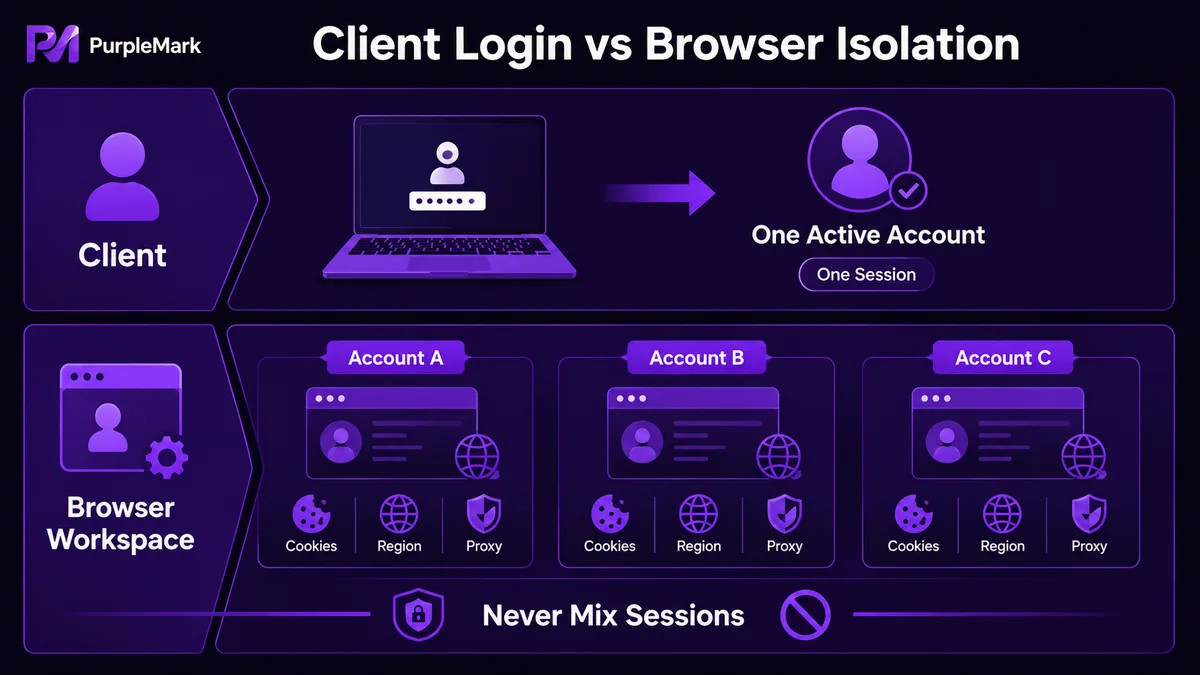
A more stable approach is to place each Steam account in an independent "account environment":
- Each account's login state (Cookie and local data) is stored separately and never mixed;
- Activity traces from different accounts do not overlap in the browser/client;
- An abnormal status on one account does not affect another account.
At the client level, this kind of "account environment" can be implemented with multiple operating-system user profiles; at the browser level, it can be implemented with isolated browser environments. When you need to manage multiple Steam accounts in batches—especially for Steam Store, Steam Community, or region-specific account switching—browser environment isolation is often more direct.
Key points for identifying the official Steam
Before installing the client, first make sure you are visiting the genuine Steam site and avoid phishing or bundled-download sites. Useful checks include:
- Official website: Steam's official domain is
store.steampowered.com/; any derivative address should ultimately belong to this root domain. - Download path: The Steam client is typically installed under an English path, such as
C:\\Program Files (x86)\\Steam\\. - Registration method: Official Steam registration uses email and does not require a phone number, paid membership, or following a public account.
- Installer page style: Steam's official installation interface is relatively simple, with the Steam logo and name in the upper-left area, and it will not show Chinese corner labels such as "XX Online Game Company."
Fake or unofficial Steam sites often ask for phone-number registration, paid membership, mandatory following of public accounts, and may advertise themselves as "official" in search results. These are obvious warning signs.
Environment isolation for managing multiple Steam accounts
Because the Steam client itself does not allow multiple concurrent instances, a browser workspace is a more practical supporting solution. A common approach is to move web-based operations for Steam Store, Steam Community, SteamDB, and similar services into isolated browser environments:
- One environment per Steam account: Parameters such as operating system, Chromium core version, UA, language, time zone, geolocation, and proxy can be configured independently. For region-specific accounts, each environment can be aligned with the target region (time zone, IP, regional language, and payment-related signals).
- Cookie and local data are fully isolated between environments: A restriction or risk-control event on one account does not spill over to others.
- Centralized proxy management: Put proxies for different regions into a proxy list and bind each account environment as needed. You do not have to open every environment just to change a proxy.
- Traceable team collaboration: When multiple people share a workspace, permissions can be grouped by member, while operation logs record sign-ins, community actions, store actions, and other activity.
In practical tooling, PurpleMark Web is a typical SaaS console that combines "account environment + proxy + team permissions + operation logs." You can create an independent environment for each Steam account and perform browser-side operations for the Steam Store, Community, Market, and related pages in those environments. On the client side, you still follow Steam's one-active-account-per-computer rule, while browser-side activity remains separated.
How to choose Steam games: don't only watch the popularity charts
Steam's popularity rankings change quickly, and the 2023 ranking mentioned in the original article is no longer current. The method for choosing games is more useful than any particular ranking:
- Look at genre, not just popularity: Decide what you want to play (story-driven, puzzle, FPS, simulation/management, survival, Roguelike, etc.), then look for recent highly rated titles in that category.
- Look at reviews, not sales: Games with many reviews and a positive rating above 85% are usually more dependable. For a newly released hit, it can make sense to wait two or three months before buying.
- Check system requirements: Confirm that your PC can run the game before purchasing so you do not end up with a game you cannot play.
- Use Demo / trial versions: Many indie games on Steam offer demos, so try them before deciding whether to buy.
Popularity charts can tell you "what people are playing now," but they cannot tell you "what fits you." Treat rankings as a discovery channel rather than a final decision rule.
Practical steps
If you want to manage multiple Steam accounts from scratch using environment isolation, follow this sequence:
- Confirm that Steam is genuine. Visit the Steam Store through the official domain, download the English installer, and keep the installation path in English.
- Create an independent browser environment for each Steam account. Open PurpleMark Web, create a new environment, and configure time zone, geolocation, language, UA, and other parameters according to the target region. If you need the local browser component, install it from the download page.
- Bind a proxy. Add proxies for the target region to the proxy-management list and bind them to the corresponding environments as needed.
- Import or sign in to the Steam account. Import an existing login state (Cookie) through JSON / Cookie Header, or register a new account inside the isolated environment.
- Use the Steam client for the main account and browser environments for web-side operations. Follow Steam's one-account-per-computer rule on the client side; use PurpleMark environments for the Store, Community, Market, and other browser-side operations.
With this setup, multiple accounts do not interfere with one another, and a risk-control event affecting one account does not disrupt the normal use of the others.
Frequently asked questions
Can running multiple Steam instances get an account banned? Steam's official mechanism does not allow multiple client sessions at the same time; forcing multiple instances will cause sessions to be disconnected. The approach of "account environment isolation + one client session for the main account" follows that client limitation and keeps browser-side activities separated.
How can I tell whether Steam is genuine?
The official domain is store.steampowered.com/; the installation path uses English folders; registration uses email without requiring phone number/membership/public-account follow; and the installation page is simple. These four checks are a useful minimum.
Can the accounts become linked? If you repeatedly switch Steam accounts in the same browser on the same computer and IP, the platform has more shared signals across those sessions. Putting each account in an independent browser environment and configuring the network environment appropriately can reduce accidental data mixing between accounts.


